Docker And Kafka Fundamentals
Table of Contents
| Basic | Intermediate | Advanced |
|---|---|---|
| 1. Docker – Basic a. What is Docker? b. Containers vs Virtual Machines c. Core Docker Concepts d. Docker Architecture e. Installing Docker f. Basic Docker Commands | 2. Docker – Intermediate a. Dockerfiles b. Image Layers & Caching c. Container Networking d. Volumes & Persistent Storage e. Docker Compose f. Working with Docker Hub | 3. Docker – Advanced a. Image Optimization & Best Practices b. Multi-Stage Builds c. Docker Security Basics d. Docker in CI/CD Pipelines e. Docker with AWS (ECR, ECS) f. Debugging & Observability |
| 4. Kafka – Basic a. What is Apache Kafka? b. Kafka Use Cases c. Core Kafka Concepts (Topic, Partition, Offset) d. Producers and Consumers e. Kafka Brokers and Clusters f. Basic Kafka Message Flow | 5. Kafka – Intermediate a. Topics and Partitions (Design Considerations) b. Consumer Groups and Rebalancing c. Message Ordering and Offsets d. Retention Policies e. Replication and Fault Tolerance f. Performance Basics | 6. Kafka – Advanced a. Kafka Architecture Deep Dive b. Leader Election and ISR c. Delivery Semantics (At-Least-Once, Exactly-Once) d. Schema Management e. Kafka Security (Authentication, Authorization, Encryption) f. Kafka at Scale (Managed Kafka, Multi-Cluster) g. Kafka in Event-Driven Architectures |
References & Further Reading
Docker – Basics
What is Docker?
Docker is a containerization platform that allows applications and their dependencies to be packaged into lightweight, portable containers.
Containers ensure the application runs the same way across development, testing, and production environments.
Example: Running a web application locally and in the cloud using the same Docker image.
Containers vs Virtual Machines
Containers share the host operating system and run a single application.
Virtual Machines run a full operating system with dedicated resources.
Containers are lighter, faster, and more portable than virtual machines.
Example: Running multiple microservices as containers on one host instead of separate VMs.
Core Docker Concepts
Image – A read-only template used to create containers
Container – A running instance of an image
Dockerfile – Instructions to build an image
Registry – Stores Docker images (Docker Hub, ECR)
Volume – Persistent storage for containers
Example: Using an Nginx image to start a web server container.
Docker Architecture
Docker follows a client-server model:
Docker Client – CLI used by the user
Docker Daemon – Manages images and containers
Docker Engine – Client + daemon together
Installing Docker
Docker can be installed using:
Docker Desktop (Windows / macOS)
Docker Engine (Linux)
Installation provides the Docker CLI and runtime required to run containers.
Basic Docker Commands
Common commands used to work with Docker:
docker pull nginx docker run -d -p 8080:80 nginx docker ps docker stop
Explanation:
Pulls the Nginx image from Docker Hub
Runs the Nginx container in detached mode with port mapping
Displays the list of running containers
Stops a running container using its container ID
Example: Pulling and running an Nginx container locally.
Docker – Intermediate
Dockerfiles
A Dockerfile defines how a Docker image is built using a series of instructions. Each instruction creates a new image layer, and the order of instructions impacts build performance and image size.
Example: A Dockerfile that installs dependencies before copying application code to take advantage of caching.
Sample Dockerfile:
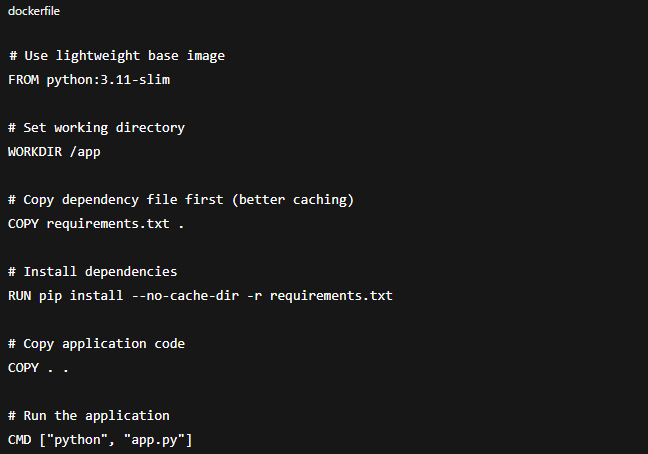
Explanation:
This Dockerfile uses a lightweight Python base image, sets a working directory, installs application dependencies efficiently using layer caching, copies the application code, and defines the command to start the Python application when the container runs.
Image Layers & Caching
Docker images are built in layers, where each layer represents a Dockerfile instruction. Docker reuses cached layers when instructions do not change, significantly speeding up builds.
Design Consideration: Placing frequently changing instructions at the bottom of the Dockerfile reduces unnecessary rebuilds.
Container Networking
Container networking allows containers to communicate with each other and external systems. Docker provides different network modes such as bridge, host, and none.
Example: Multiple containers communicating with each other using a bridge network in a microservices setup.
Volumes & Persistent Storage
Containers are ephemeral by default, meaning data is lost when a container stops. Volumes provide persistent storage that exists independently of the container lifecycle.
Example: Storing database data in a Docker volume so it remains available after container restarts.
Docker Compose
Docker Compose is used to define and run multi-container applications using a YAML file. It simplifies managing dependencies between services such as databases, APIs, and caches.
Sample docker-compose.yml:
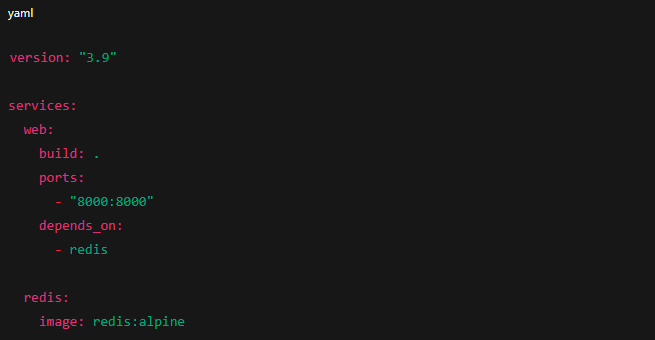
Explanation:
This Docker Compose file runs a web application and a Redis service together, handles service dependencies, and exposes the application port for local access.
Run with:

This command starts all services defined in the docker-compose.yml file, builds required images if needed, and runs the containers together.
Working with Docker Hub
Docker Hub is a public registry used to store, share, and version Docker images. Images can be pulled, tagged, and pushed to enable reuse across teams and environments.
Example: Publishing a custom application image to Docker Hub for deployment.
Docker – Advanced
Image Optimization & Best Practices
At an advanced level, Docker image optimization focuses on performance, security, and maintainability. Key practices include using minimal base images, reducing image layers, and avoiding unnecessary packages.
Optimized images improve startup time, reduce attack surface, and lower storage and network costs.
Multi-Stage Builds
Multi-stage builds separate the build environment from the runtime environment within a single Dockerfile. This allows developers to use full toolchains during build time while producing a minimal final image.
This approach is essential for production-grade container images.
Docker Security Basics
Docker security focuses on minimizing risk at the container and image level. Key considerations include running containers with least privilege, using trusted base images, and regularly scanning images for vulnerabilities.
Container security becomes critical when running workloads in shared or public cloud environments.
Docker in CI/CD Pipelines
In advanced CI/CD setups, Docker is used as a standard packaging and execution unit. Images are built once, tested, and then promoted across environments to ensure consistency.
Docker enables reproducible builds and environment parity across the pipeline.
Docker with AWS (ECR, ECS)
Docker integrates closely with AWS services for containerized workloads. Amazon ECR is used to store private container images, while Amazon ECS runs and manages containers at scale.
This combination enables secure, scalable, and cloud-native container deployments.
Debugging & Observability
Advanced Docker usage requires visibility into container behavior. Logs, metrics, and runtime inspection are used to diagnose failures and performance issues.
Effective observability reduces downtime and accelerates issue resolution in production systems.
Kafka – Basics
What is Apache Kafka?
Apache Kafka is a distributed event streaming platform used to publish, store, and process streams of data in real time.
Kafka is commonly used for event-driven systems and data pipelines.
Example: Streaming user activity events from an application to analytics systems.
Kafka Use Cases
Kafka is used for:
Event-driven architectures
Log aggregation
Real-time data processing
Decoupling microservices
Example: An order service publishes events that multiple downstream services consume.
Core Kafka Concepts (Topic, Partition, Offset)
Topic – A category where messages are published
Partition – A unit of parallelism within a topic
Offset – Position of a message within a partition
Producers and Consumers
Producer – Sends messages to Kafka topics
Consumer – Reads messages from Kafka topics
Producers and consumers are decoupled, allowing systems to scale independently.
Kafka Producer Example:
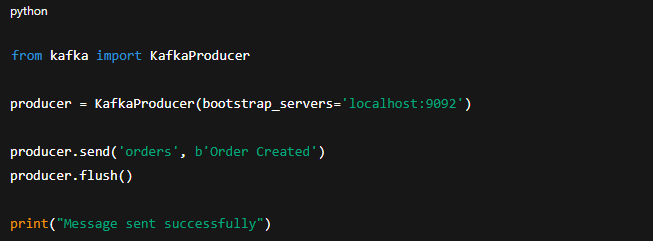
Explanation:
KafkaProducer(bootstrap_servers='localhost:9092')
 Creates a producer and connects it to the Kafka broker running on localhost at port 9092.
producer.send('orders', b'Order Created')
 Sends a message with value Order Created to the Kafka topic named orders.
What this demonstrates:
Connecting to Kafka broker
Sending a message to a topic
Basic event publishing
Kafka Consumer Example:
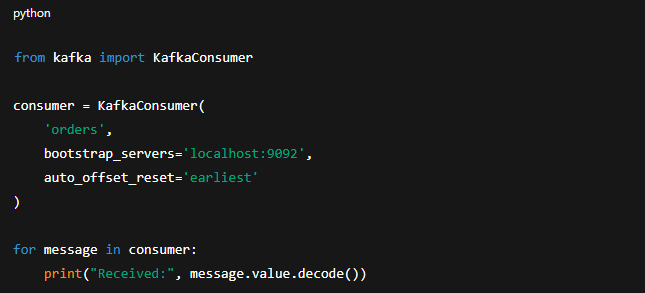
Explanation:
from kafka import KafkaConsumer
 Imports the Kafka consumer class used to read messages from Kafka topics.
bootstrap_servers='localhost:9092'
 Connects the consumer to the Kafka broker running on the local machine.
auto_offset_reset='earliest'
 Starts reading messages from the beginning of the topic if no offset is already stored.
What this demonstrates:
Subscribing to a topic
Reading messages
Offset handling (basic)
Kafka Brokers and Clusters
Broker – A Kafka server that stores and serves data
Cluster – A group of brokers working together
Kafka clusters provide fault tolerance and scalability.
Example: A 3-broker Kafka cluster ensures availability if one broker fails.
Basic Kafka Message Flow
Producer sends a message to a topic
Kafka broker stores the message
Consumer reads the message using its offset
Example: An event is published once and consumed by multiple consumer groups independently.
Kafka – Intermediate
Topics and Partitions (Design Considerations)
Topics are divided into partitions to enable parallelism and scalability. The number of partitions directly impacts throughput and consumer scalability.
Design Consideration: Choosing the correct number of partitions is critical and difficult to change later.
Consumer Groups and Rebalancing
Consumer groups allow multiple consumers to share the workload of a topic. Kafka automatically rebalances partitions when consumers join or leave a group.
Example: Adding a new consumer instance triggers partition redistribution across the group.
Message Ordering and Offsets
Kafka guarantees ordering within a partition, not across partitions. Offsets track the position of messages consumed by each consumer.
Example: A consumer resumes processing from the last committed offset after a restart.
Retention Policies
Retention policies control how long Kafka stores messages, regardless of consumption. Messages can be retained based on time or storage size.
Example: Keeping logs for seven days even if consumers have already processed them.
Replication and Fault Tolerance
Kafka replicates partitions across multiple brokers to ensure high availability. If a broker fails, a replica can become the new leader.
Example: A replication factor of three ensures data remains available even if one broker fails.
Performance Basics
Kafka performance depends on factors such as partition count, replication factor, and producer configuration. Balancing performance and durability is a key intermediate-level responsibility.
Example: Increasing partitions to improve throughput while monitoring broker load.
Kafka – Advanced
Kafka Architecture Deep Dive
Kafka’s architecture is built around distributed logs, partitions, and replication. Each component plays a role in ensuring scalability, durability, and fault tolerance.
Understanding Kafka internals is essential for designing reliable, high-throughput systems.
Leader Election and ISR
Kafka uses leader election to manage which broker handles read and write operations for a partition. The In-Sync Replica (ISR) set ensures data consistency across replicas.
This mechanism allows Kafka to recover gracefully from broker failures.
Delivery Semantics (At-Least-Once, Exactly-Once)
Kafka supports multiple delivery guarantees depending on producer and consumer configuration. These semantics define how message duplication or loss is handled.
Choosing the correct delivery model is critical for data accuracy and system reliability.
Schema Management
Schema management ensures that producers and consumers agree on data structure. It enables schema evolution without breaking downstream systems.
Schema governance becomes essential in large, multi-team Kafka environments.
Kafka Security (Authentication, Authorization, Encryption)
Kafka security focuses on protecting data in motion and controlling access. Authentication verifies client identity, authorization controls permissions, and encryption secures data transmission.
Security is mandatory for Kafka deployments handling sensitive or regulated data.
Kafka at Scale (Managed Kafka, Multi-Cluster)
At scale, Kafka deployments require operational maturity. Managed Kafka services reduce operational overhead, while multi-cluster setups improve isolation and resilience.
Scaling Kafka involves trade-offs between cost, performance, and operational complexity.
Kafka in Event-Driven Architectures
Kafka is a core building block in event-driven architectures. It enables loose coupling between services, real-time data flow, and scalable system design.
Kafka often acts as the central event backbone in modern distributed systems.
References & Further Reading
| Category | Resource | Link |
|---|---|---|
| Docker | Docker Official Documentation | docs.docker.com/ |
| Docker Getting Started Guide | docs.docker.com/get-started/ | |
| Dockerfile Reference | docs.docker.com/engine/reference/builder/ | |
| Docker Image Best Practices | docs.docker.com | |
| Docker Security | docs.docker.com/engine/security/ | |
| Docker in CI/CD | docs.docker.com/build/ci/ | |
| Kafka | Apache Kafka Official Documentation | kafka.apache.org/documentation/ |
| Kafka Introduction – How Kafka Works | www.confluent.io | |
| Kafka Core Concepts | medium.com | |
| Kafka Security | kafka.apache.org/documentation/#security | |
| Kafka Streams & Event-Driven Architectures | developer.confluent.io/learn-kafka/ |