Python Learning Guide
Table of Contents
| Beginner Level | Intermediate Level | Advanced Level |
|---|---|---|
| 1. Introduction to Python | 1. Object-Oriented Programming (OOP) | 1. Working with JSON and APIs |
| 2. Installation and Setup | 2. Iterators and Generators | 2. Database Connectivity |
| 3. Python Basics | 3. Decorators | 3. Testing |
| 4. Variables and Data Types | 4. Regular Expressions | 4. Magic Methods (Dunder Methods) |
| 5. Operators | 5. File Handling | 5. Collections Module in Python |
| 6. Control Flow Statements | 6. Comprehensions | |
| 7. Data Structures | 7. Working with Dates and Times | |
| 8. Functions | 8. Functional Programming Concepts | |
| 9. Strings and String Operations | 9. Modules and Packages in Python | |
| 10. Exception Handling | ||
| 11. Basic Best Practices |
1. Introduction to Python
Why Python?
-
Easy to Learn: Simple, readable syntax similar to English
-
Versatile: Used in web development, data science, automation, AI/ML, and more
-
Rich Ecosystem: Extensive libraries and frameworks
-
Strong Community: Large community support and documentation
-
Cross-Platform: Runs on Windows, macOS, Linux, and more
2. Installation and Setup
Installing Python
Windows:
-
Download from python.org
-
Run installer and check "Add Python to PATH"
-
Verify installation: python –version
macOS:
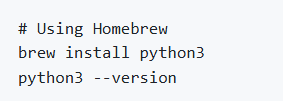
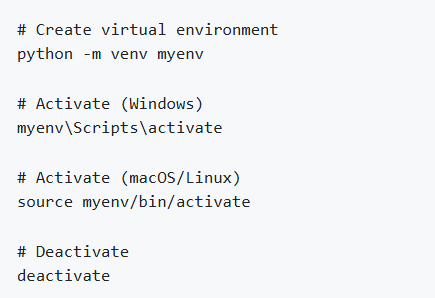
Setting Up Virtual Environments
Virtual environments isolate project dependencies.
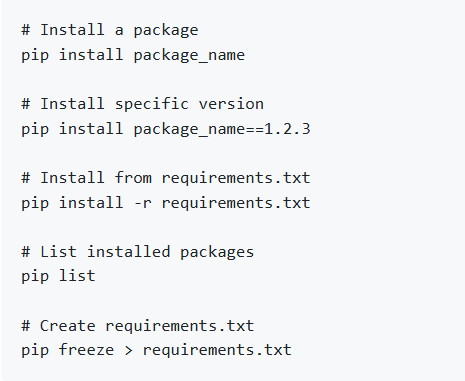
Installing Packages with pip
IDE and Text Editor Options
VS Code (Recommended): Lightweight with Python extension
PyCharm: Full-featured Python IDE
Jupyter Notebook: Interactive coding environment
Sublime Text / Atom: Lightweight text editors
3. Python Basics
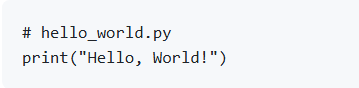
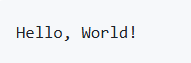
Your First Python Program
Output:
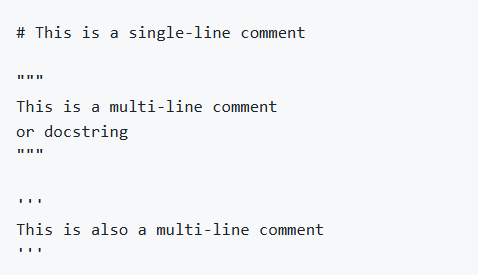
Comments
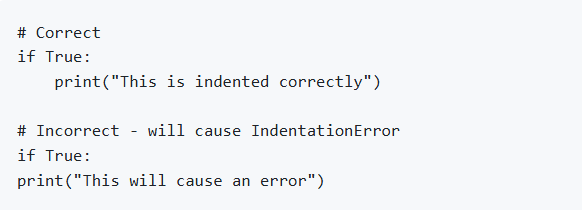
Indentation
Python uses indentation to define code blocks (instead of braces)
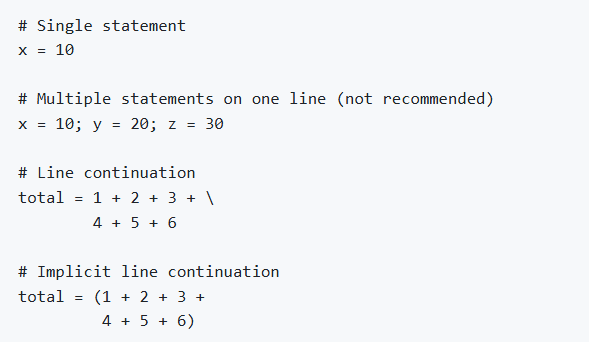
Python Statements
4. Variables and Data Types
Variables
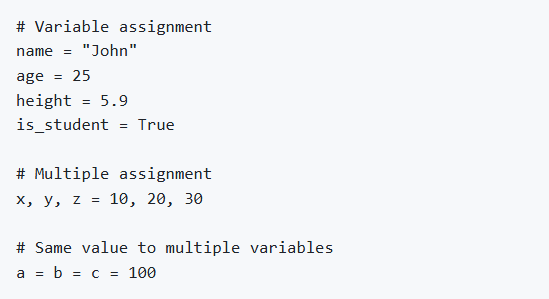
Variables are containers for storing data. Python is dynamically typed.
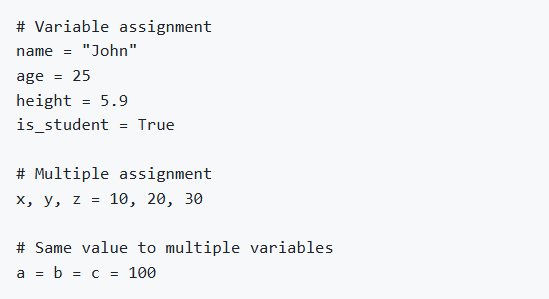
Variable Naming Rules:
Must start with letter or underscore
Can contain letters, numbers, and underscores
Case-sensitive (name and Name are different)
Cannot use Python keywords
Data Types
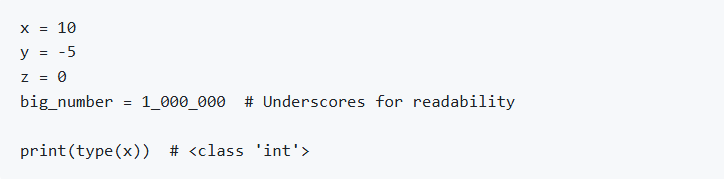
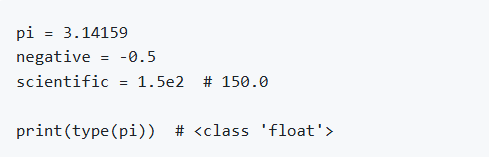
Numeric Types
Integer (int)
Float
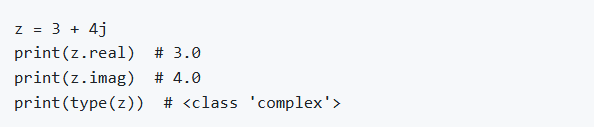
Complex
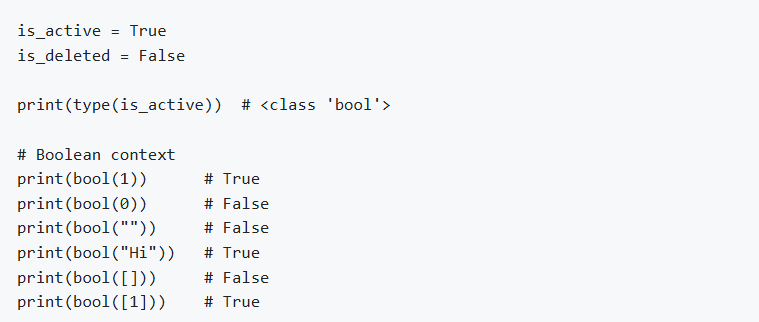
Boolean (bool)
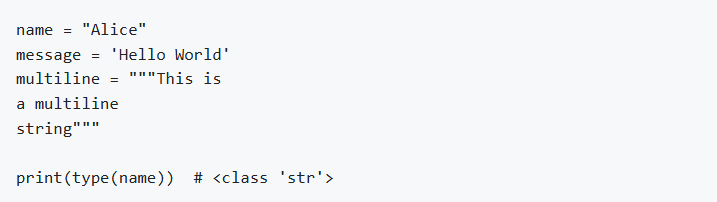
String (str)
None Type

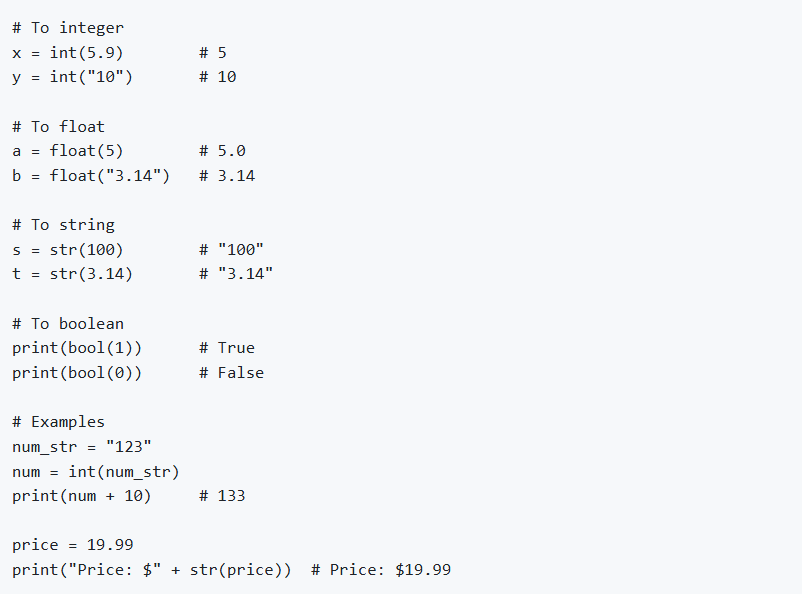
Type Conversion (Type Casting)
Checking Data Types

5. Operators
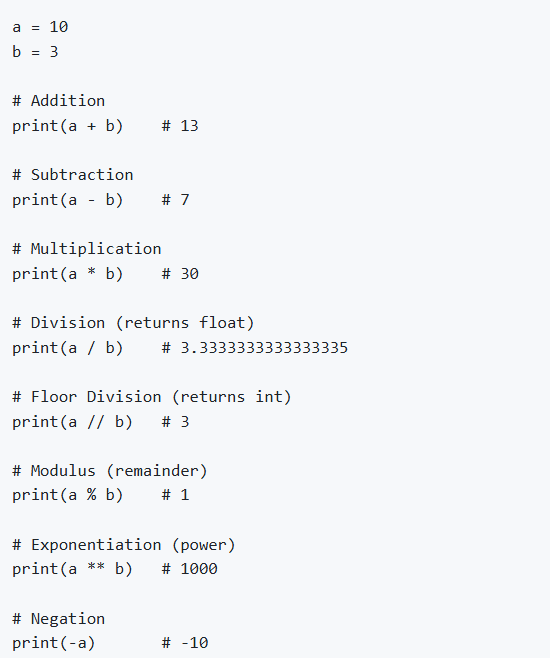
Arithmetic Operators
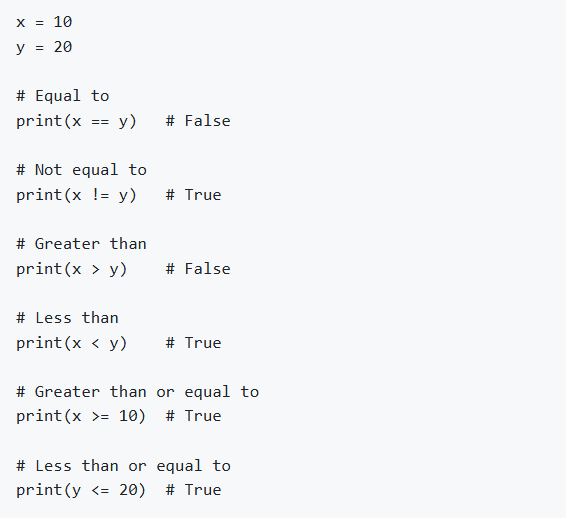
Comparison Operators
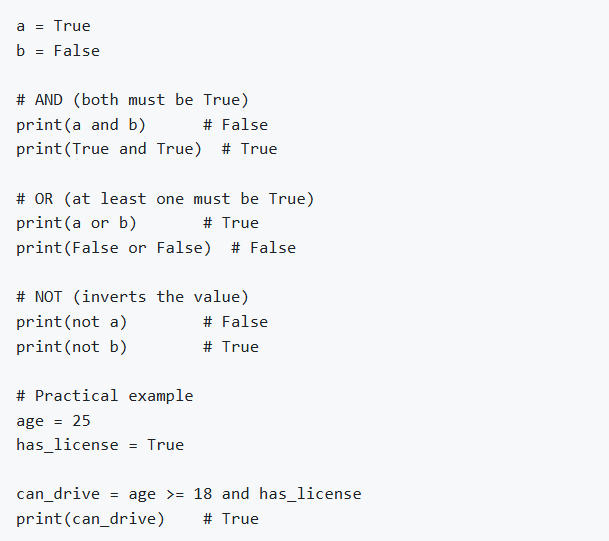
Logical Operators
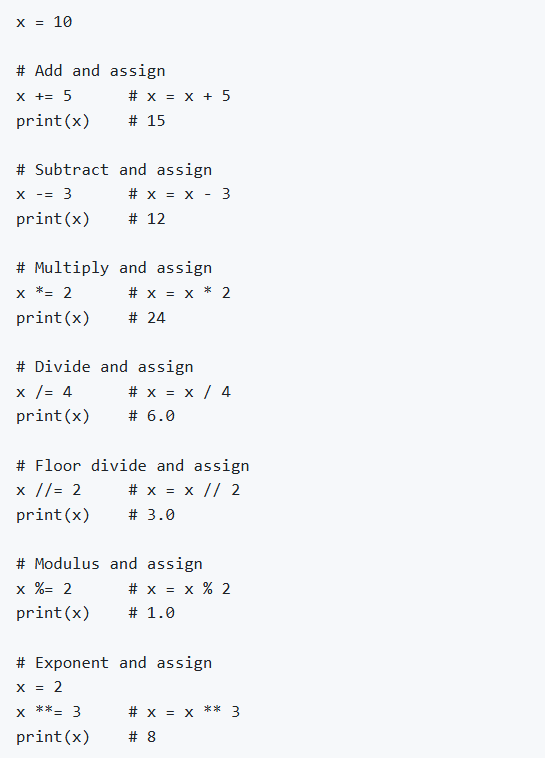
Assignment Operators
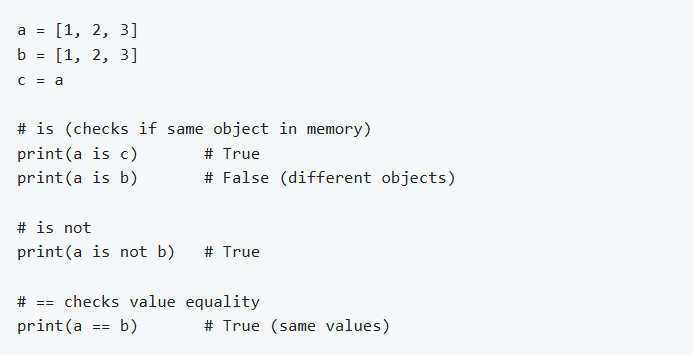
Identity Operators
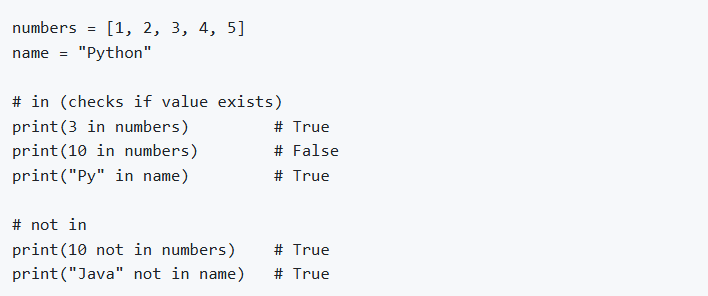
Membership Operators
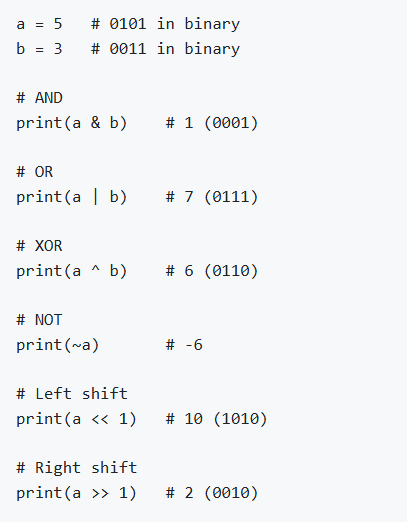
Bitwise Operators
Operator Precedence
From highest to lowest:
( ) - Parentheses
** - Exponentiation
+x, -x, ~x - Unary plus, minus, NOT
*, /, //, % - Multiplication, Division, Floor division, Modulus
+, - - Addition, Subtraction
<<, >> - Bitwise shifts
& - Bitwise AND
^ - Bitwise XOR
| - Bitwise OR
==, !=, <, <=, >, >=, is, is not, in, not in - Comparisons
not - Logical NOT
and - Logical AND
or - Logical OR

6. Control Flow Statements
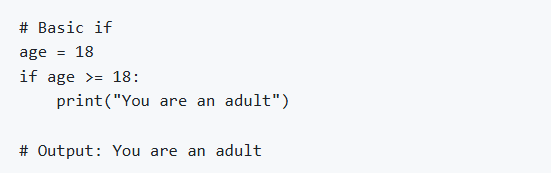
if Statement
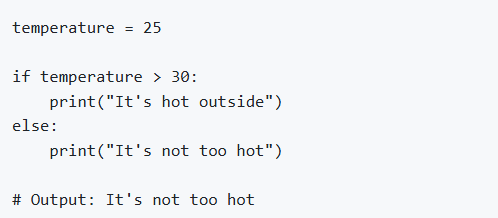
if-else Statement
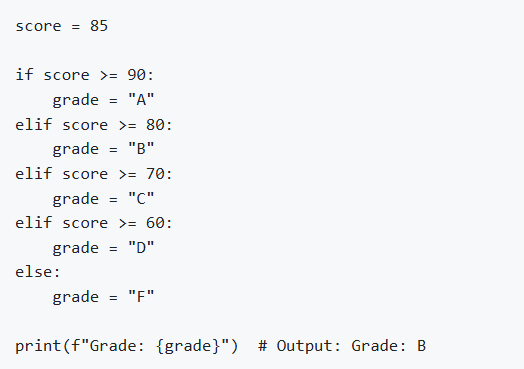
if-elif-else Statement
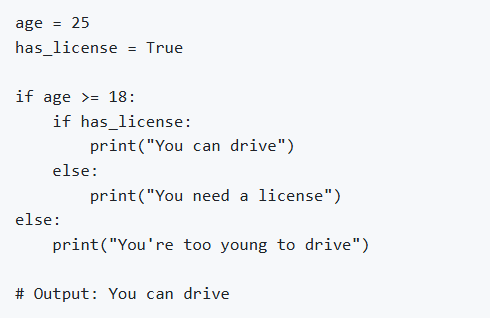
Nested if
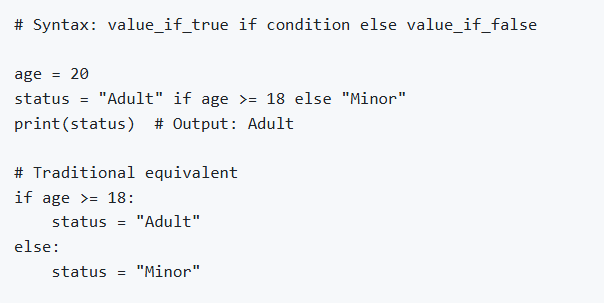
Ternary Operator (Conditional Expression)
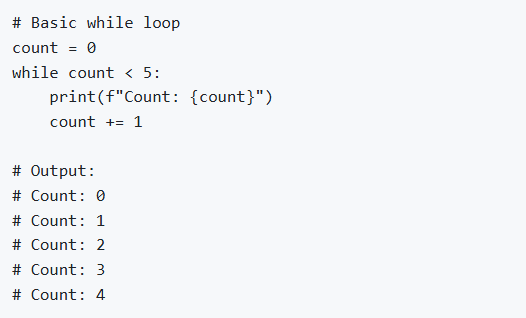
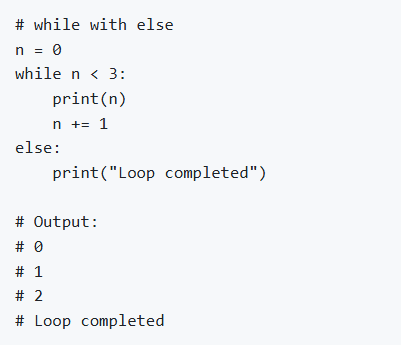
while Loop
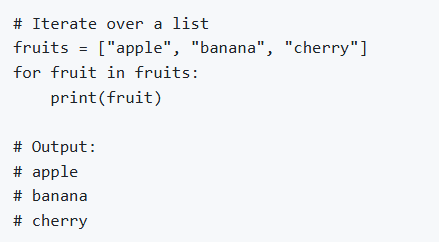
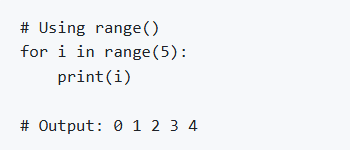
for Loop
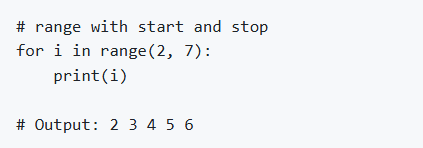
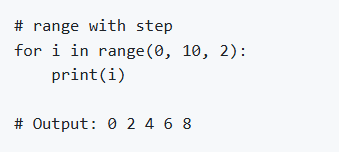
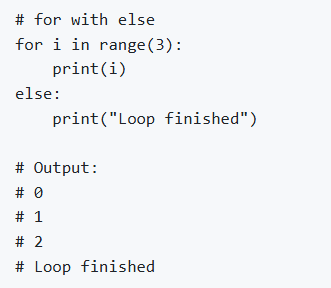
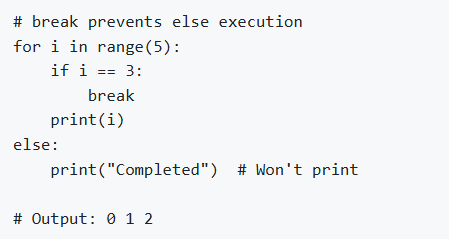
break Statement
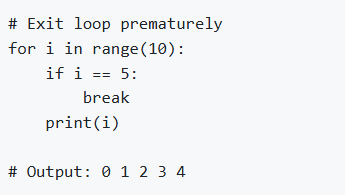
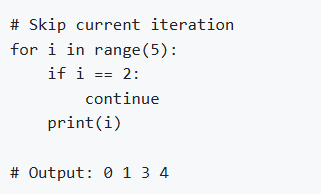
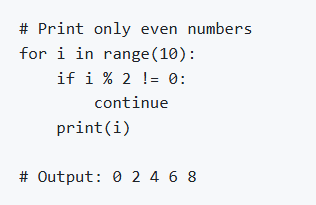
continue Statement
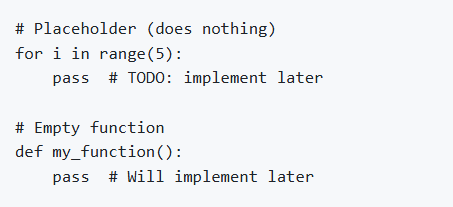
pass Statement
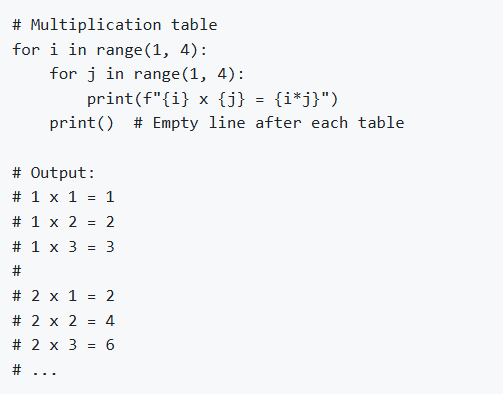
Nested Loops
7. Data Structures
Lists
Lists are ordered, mutable collections that can contain different data types.
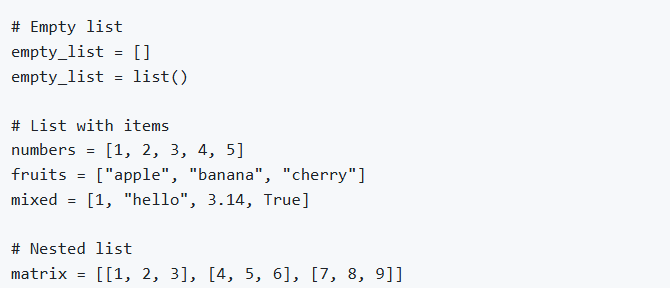
Creating Lists
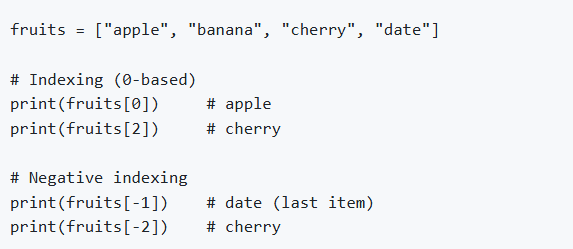
Accessing List Elements
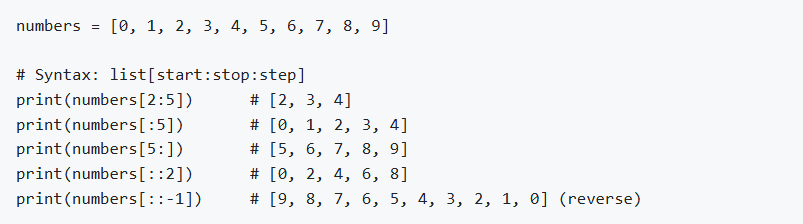
List Slicing
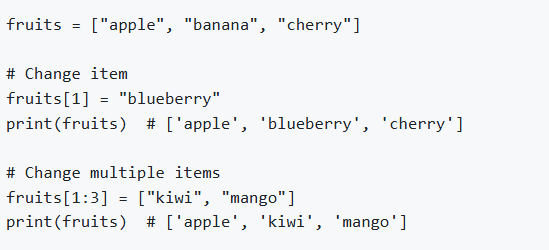
Modifying Lists
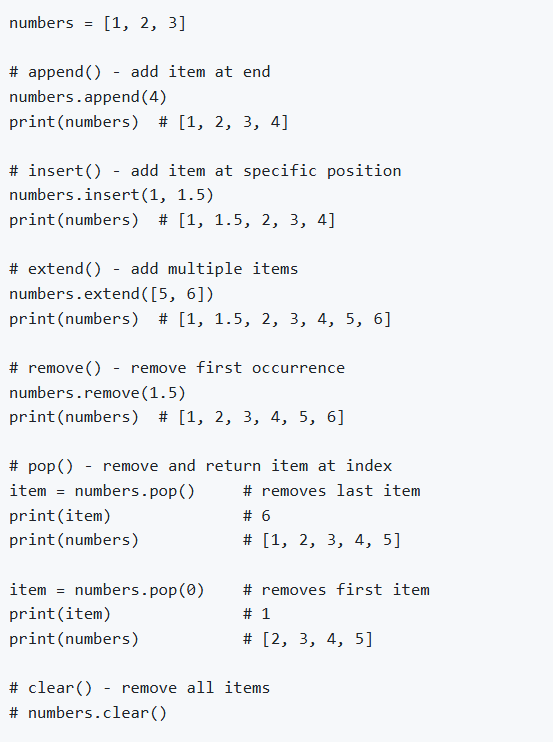
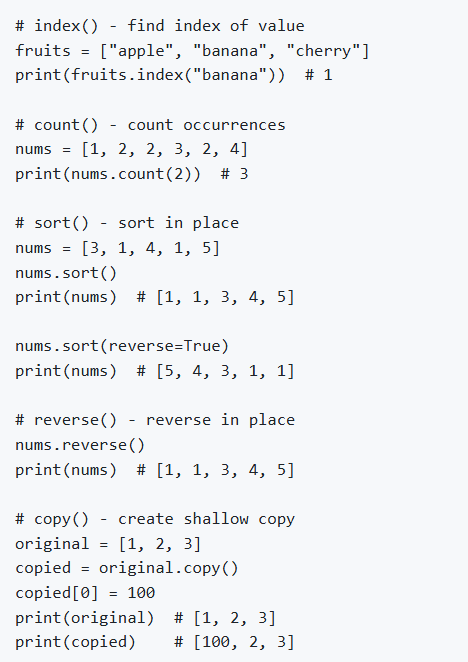
List Methods
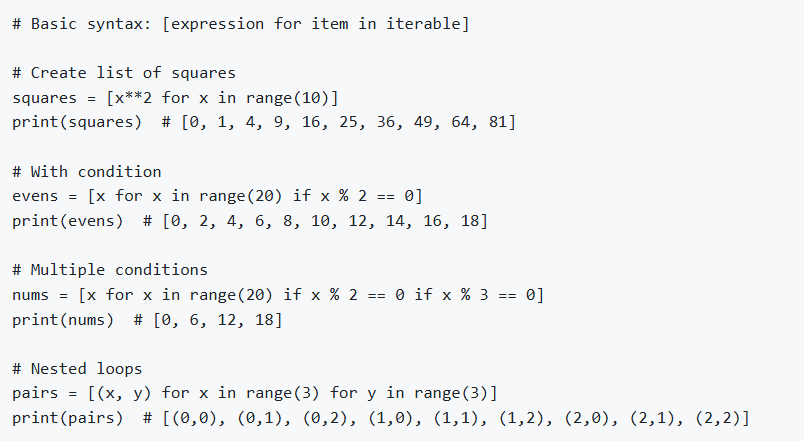
List Comprehension
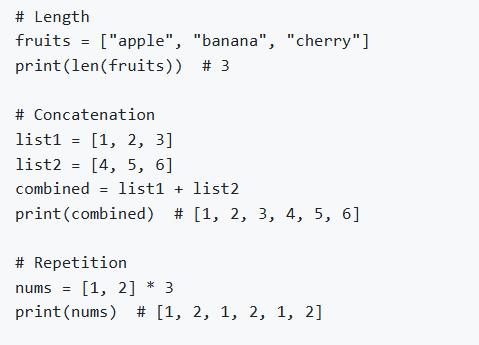
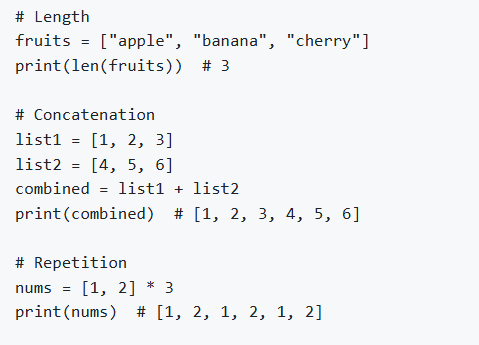
Common List Operations
Tuples
Tuples are ordered, immutable collections.
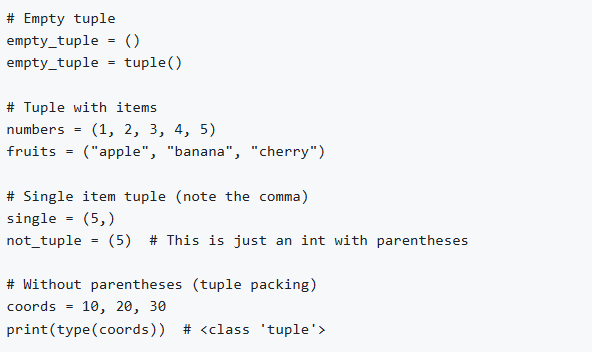
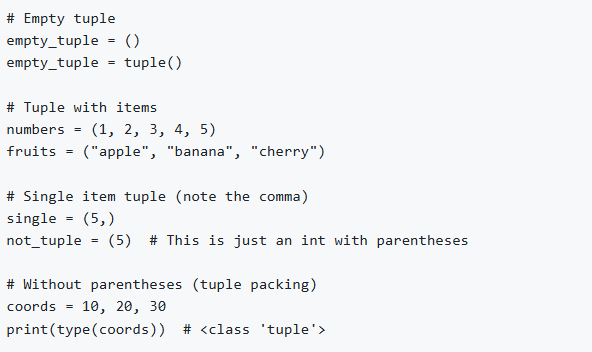
Creating Tuples
Accessing Tuple Elements
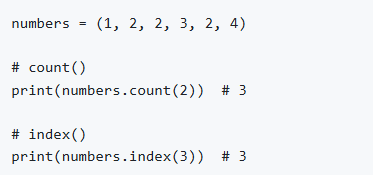
Tuple Methods
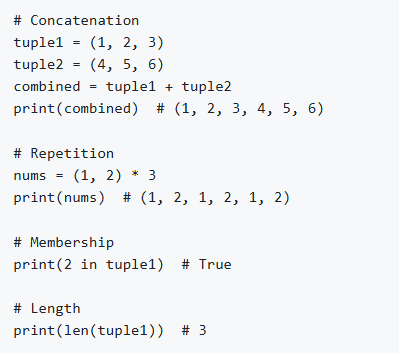
Tuple Operations
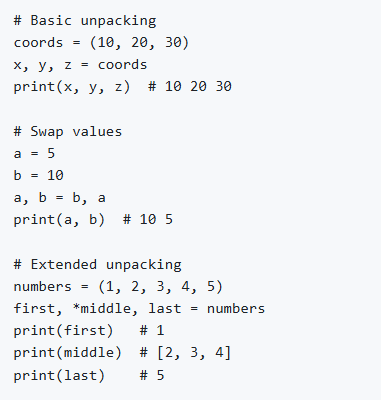
Tuple Unpacking
When to Use Tuples vs Lists
Use Tuples when:
Data should not change (immutable)
Representing fixed collections (coordinates, RGB values)
As dictionary keys (lists can't be keys)
Better performance than lists
Use Lists when:
Data will change over time
Need methods like append, remove, etc.
Mutable Vs Immutable
Mutable: Objects that can be changed after creation
Examples: list, set, dict
Immutable: Objects that cannot be changed after creation
Examples: tuple, boolean
Sets
Sets are unordered collections of unique elements.
In Python, standard sets (set()) are mutable, meaning you can add or remove elements after they are created. However, the elements contained within a set must be immutable types (like tuples, strings, or numbers).
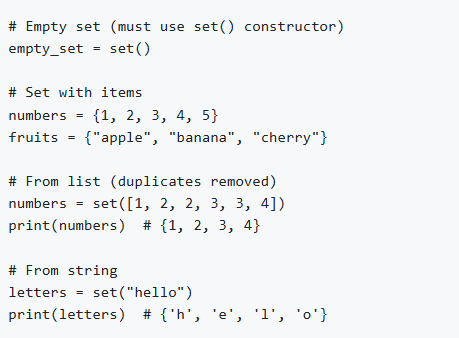
Creating Sets
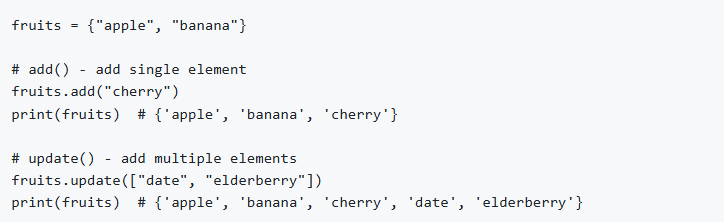
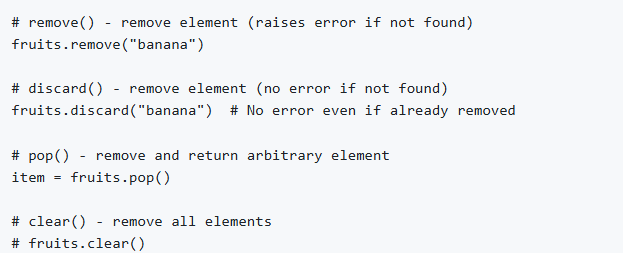
Set Methods
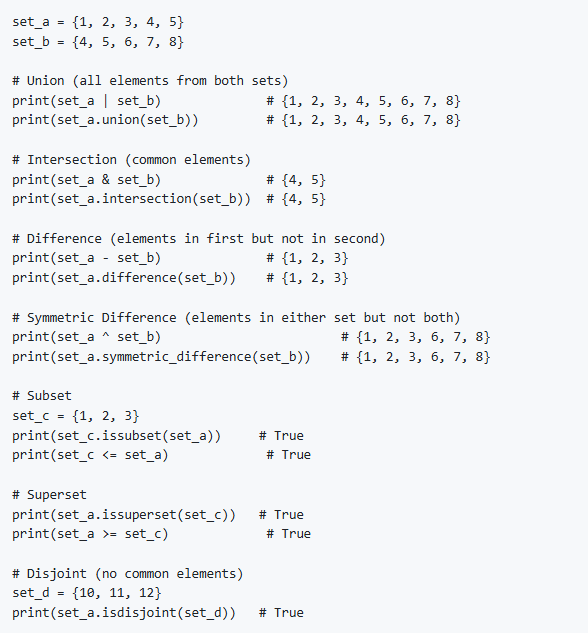
Set Operations
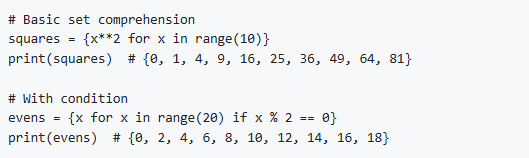
Set Comprehension
Dictionaries
Dictionaries are unordered collections of key-value pairs.
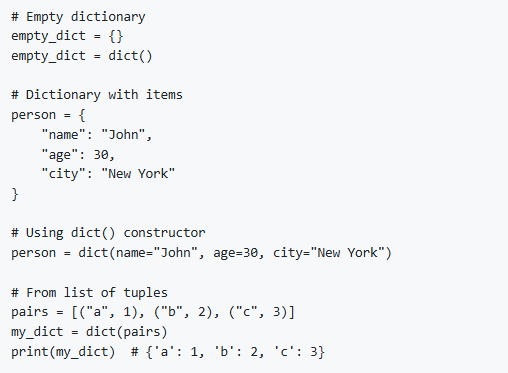
Creating Dictionaries
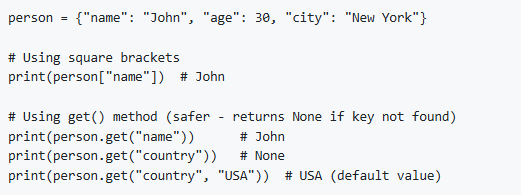
Accessing Dictionary Elements
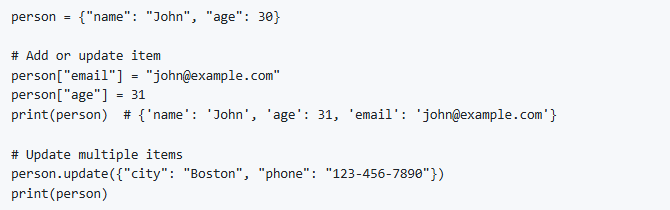
Modifying Dictionaries
Dictionary Methods
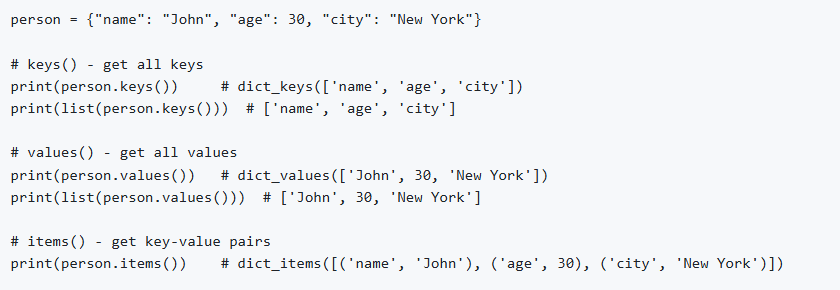
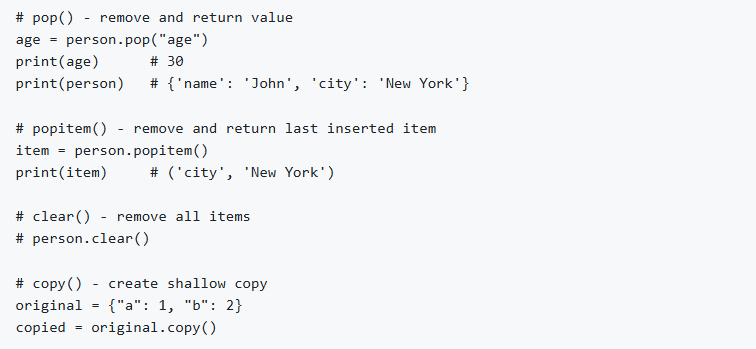
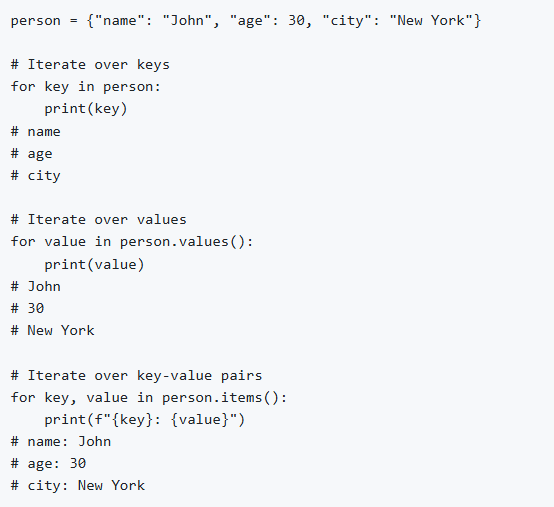
Iterating Through Dictionaries
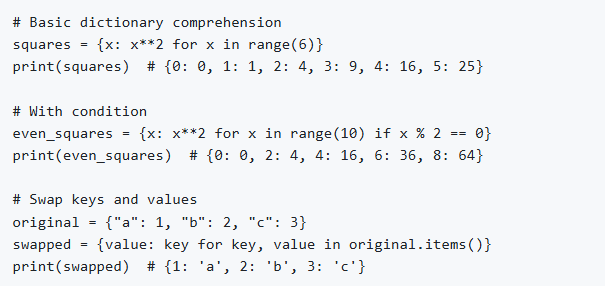
Dictionary Comprehension
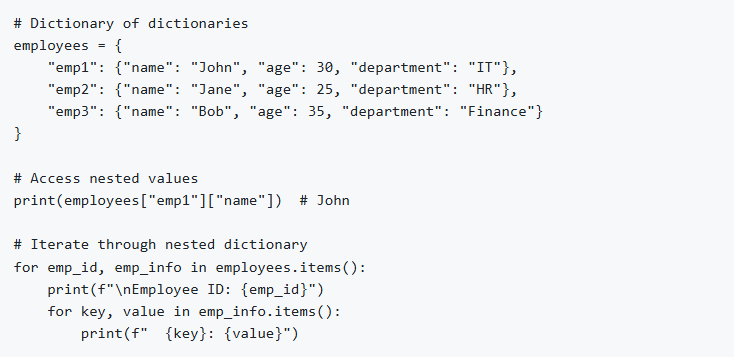
Nested Dictionaries
8. Functions
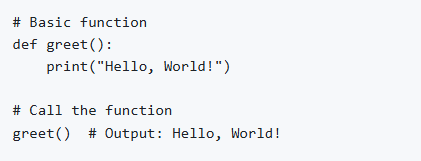
Functions are reusable blocks of code that perform specific tasks.
Defining Functions
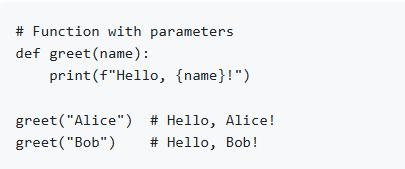
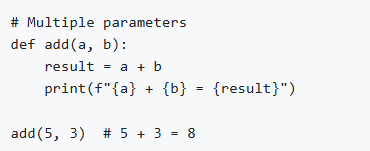
Function Parameters
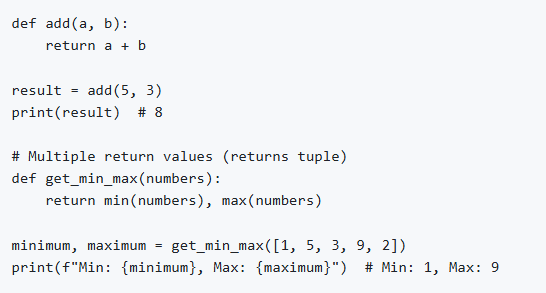
Return Statement
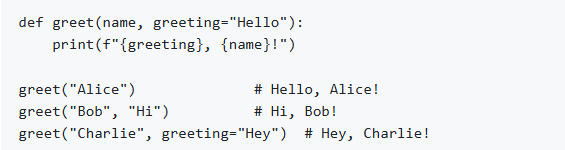
Default Parameters
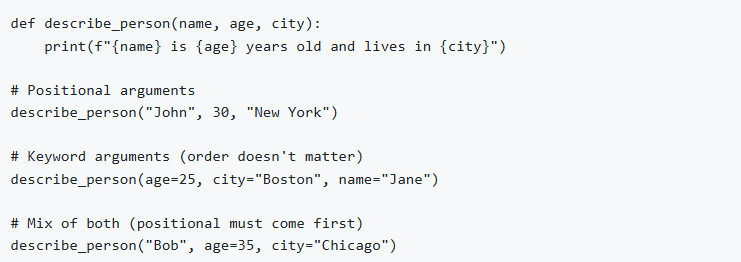
Keyword Arguments
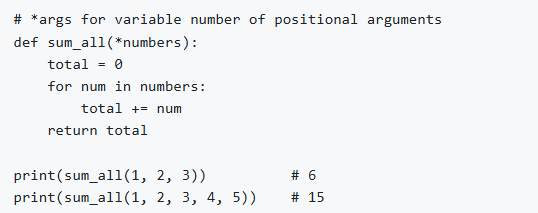
Arbitrary Arguments (*args)
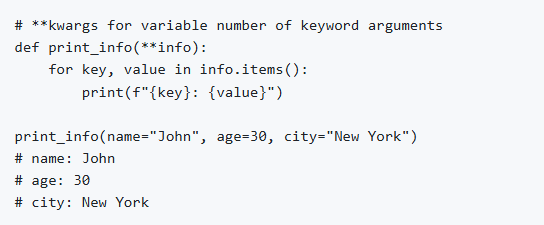
Arbitrary Keyword Arguments (**kwargs)
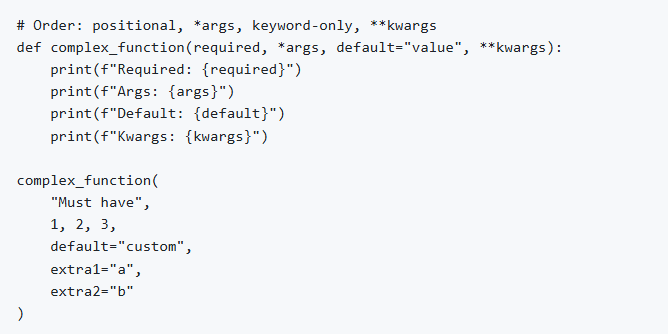
Combining Different Parameter Types
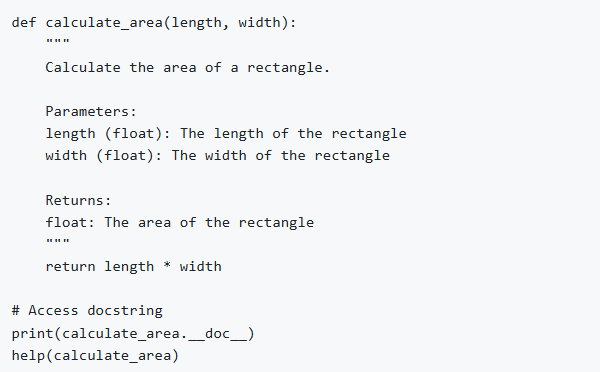
Docstrings
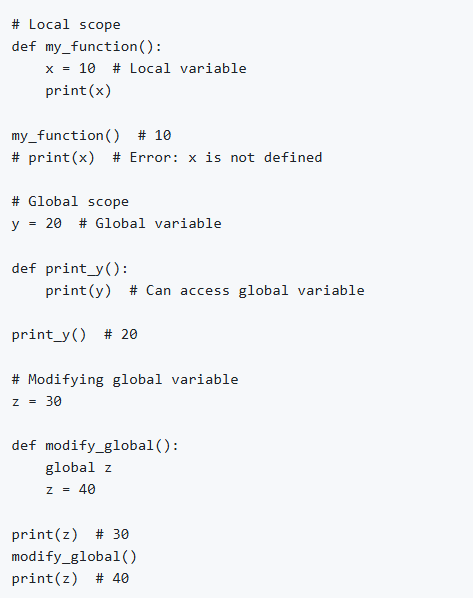
Scope and Global Variables
9. String and String Operations
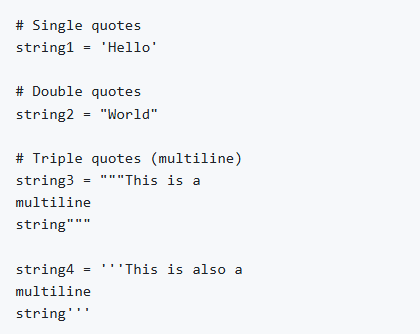
String Creation
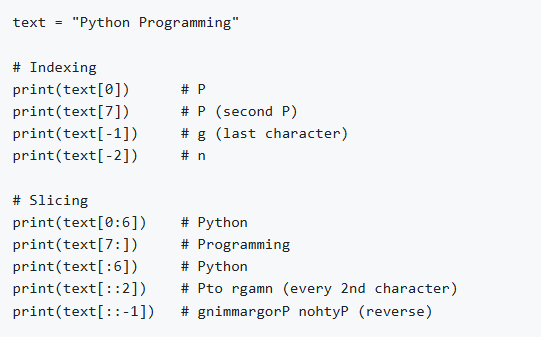
String Indexing and Slicing
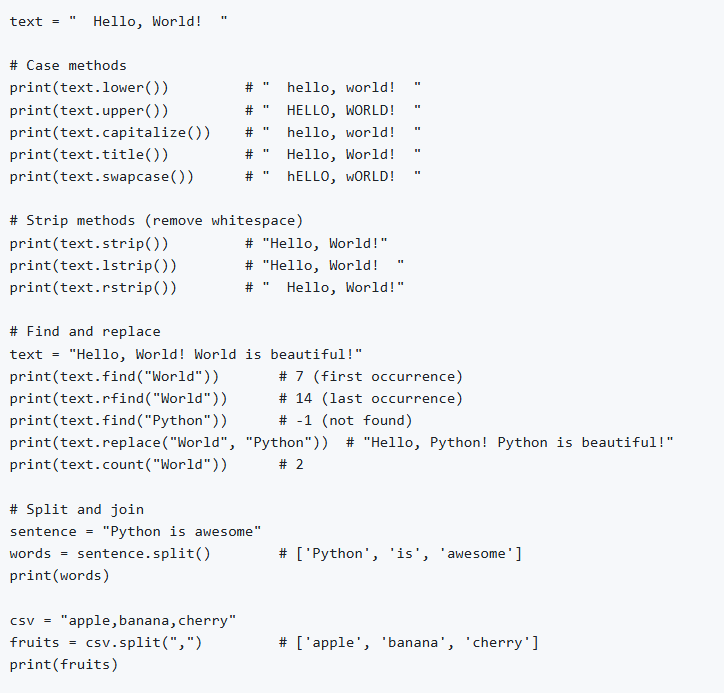
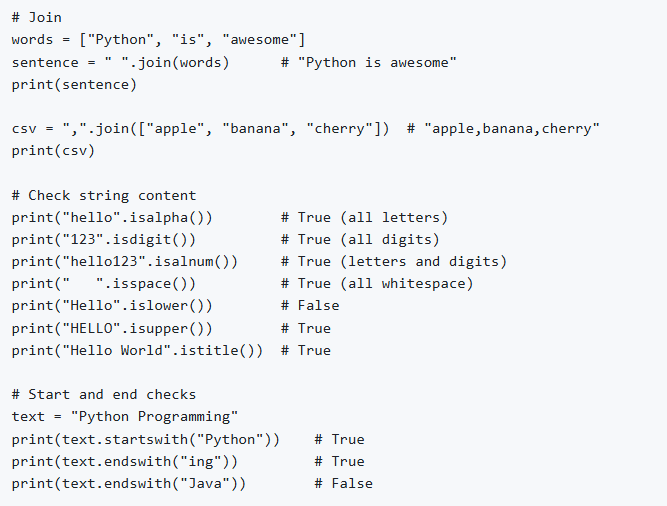
String Methods
String Formatting
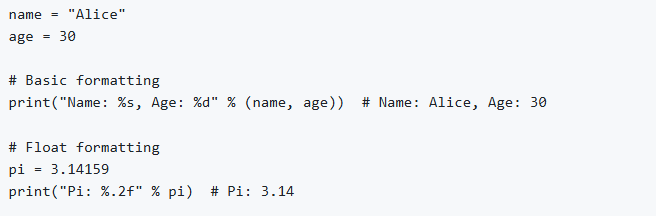
Old Style (% operator)
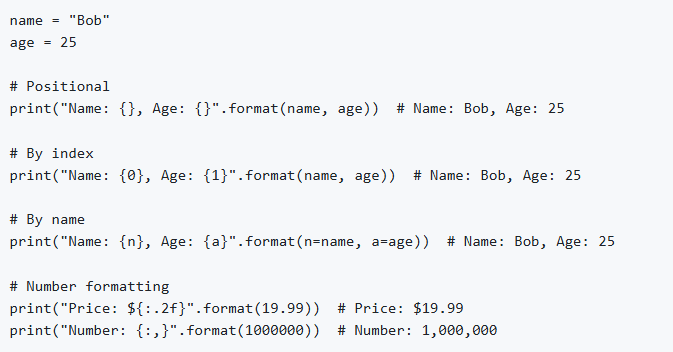
str.format()
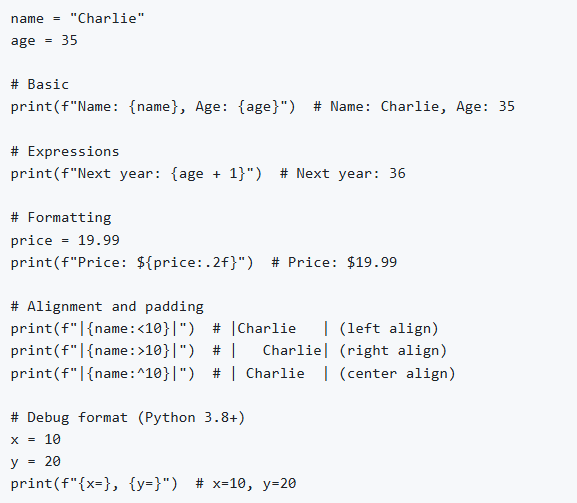
f-strings (Formatted String Literals) - Python 3.6+
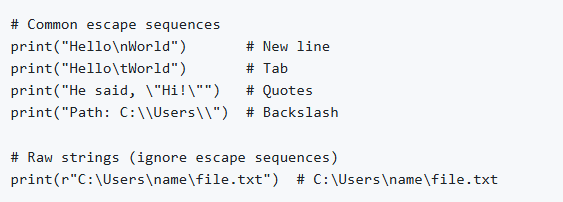
String Escape Characters
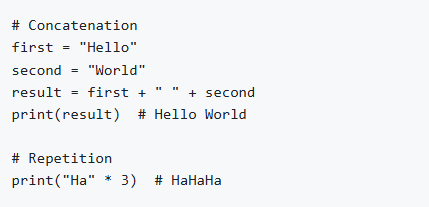
String Concatenation and Repetition
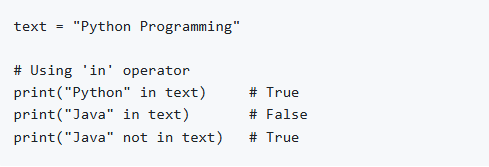
Checking Substrings
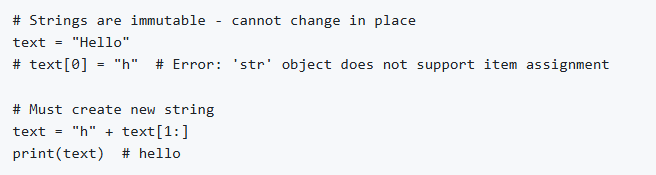
String Immutability
10. Exception Handling
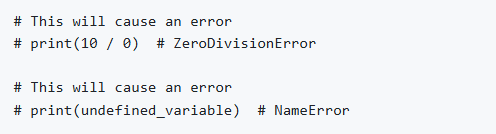
What are Exceptions?
Exceptions are errors that occur during program execution.
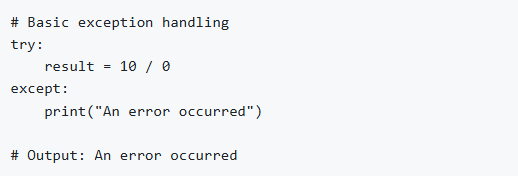
try-except Block
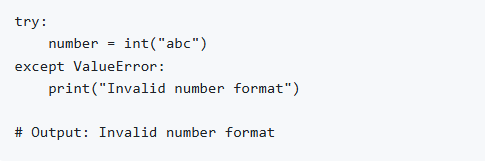
Catching Specific Exceptions
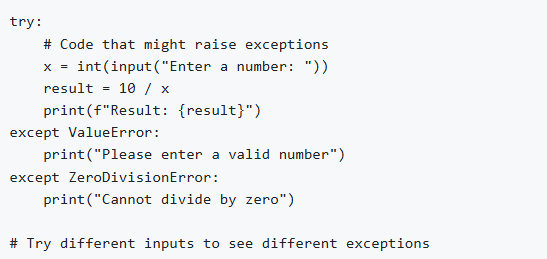
Multiple except Blocks
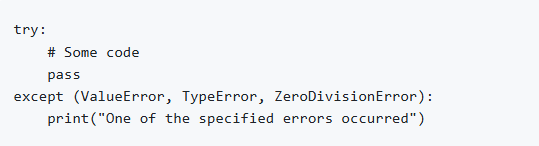
Catching Multiple Exceptions
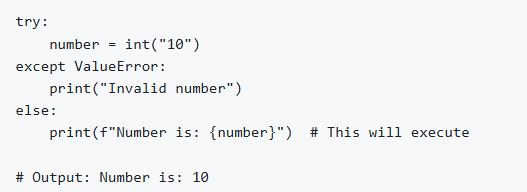
else Clause
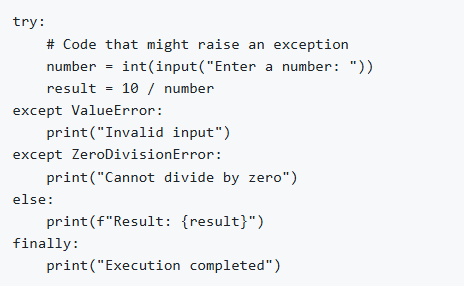
finally Clause
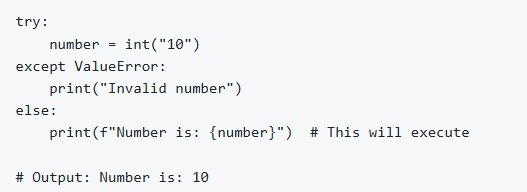
Complete try-except Structure
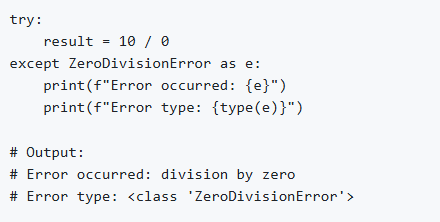
Getting Exception Details
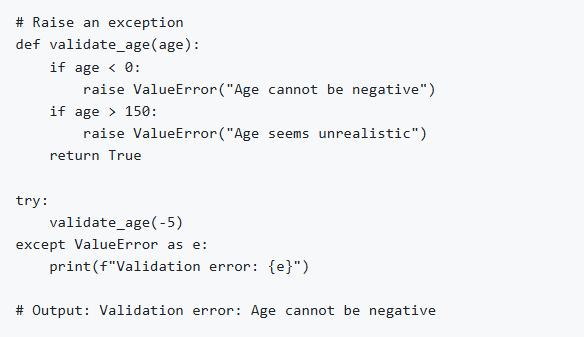
Raising Exceptions
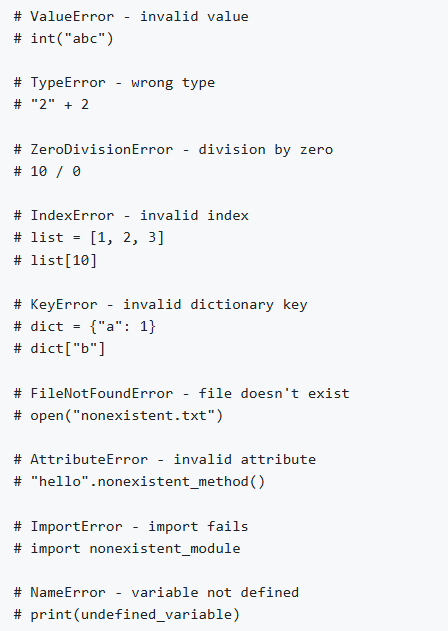
Common Built-in Exceptions
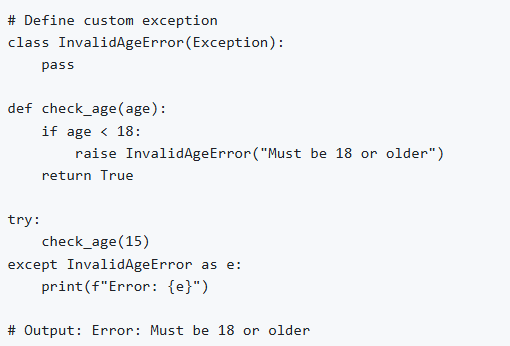
Custom Exceptions
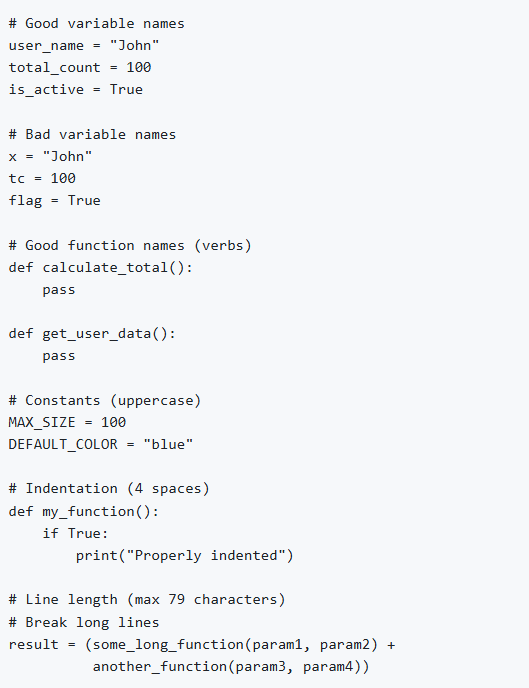
11. Basic Best Practices
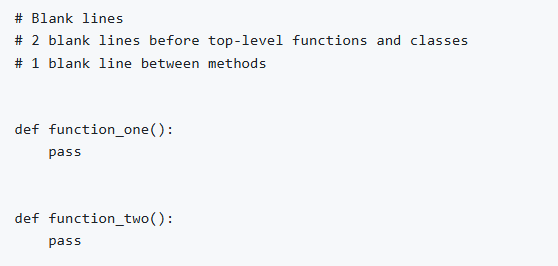
Code Style (PEP 8)
Comments and Documentation
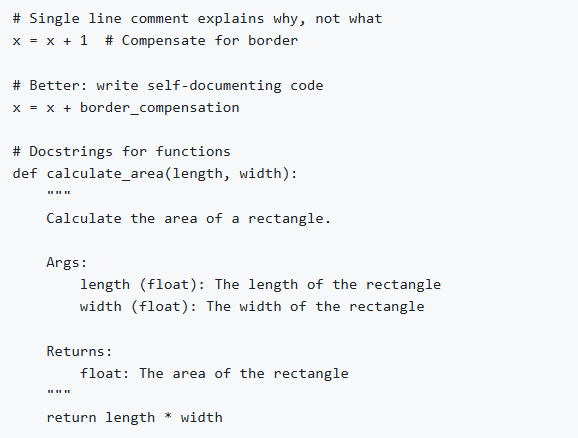
Be specific with exceptions.
Dry principle (don’t repeat yourself)
Keep functions small and focused.
Use meaningful names
Summary
This document covered fundamental Python concepts including:
Python installation and setup
Basic syntax and data types
Operators and control flow
Data structures (lists, tuples, sets, dictionaries)
Functions and lambda expressions
String manipulation
File handling and I/O operations
Exception handling
Modules and packages
Best practices and coding standards
Python Intermediate
Object-Oriented Programming (OOP)
OOP is a way of organizing code that uses objects and classes to represent real-world entities and their behavior. In OOP, objects have attributes that have specific data and can perform certain actions using methods. Python supports the core principles of object-oriented programming, which are the building blocks for designing robust and reusable software.
Class
A class is a collection of objects; classes are blueprints for creating objects. A class defines a set of attributes and methods that the created objects (instances) can have.
Classes are created by keyword class.
Attributes are the variables that belong to a class.
Attributes are always public and can be accessed using the dot (.) operator. Example: Myclass.Myattribute
Creating a Class:
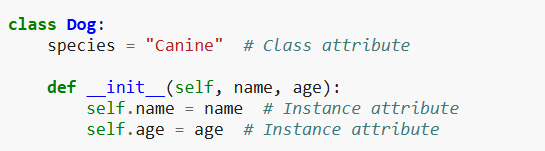
Think of a class as a design for making something. For example, you can have a blueprint for a car. The blueprint itself is not a car, but you can use it to create many cars.
Objects
An object is a real instance of a class.
If a class is a blueprint, an object is the actual thing built from it.
Example: If Car is a class, then:
Your car, your friend’s car are objects of that class.
Each object has its own data but uses the same design.
Creating Object:
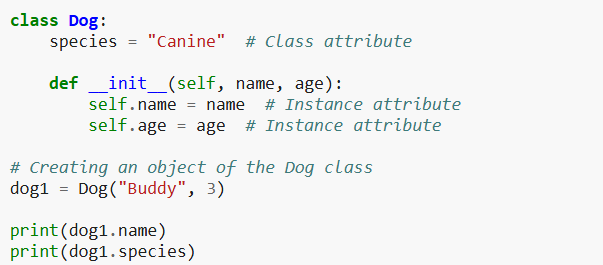
Four Pillars of OOP in Python
Inheritance
Polymorphism
Encapsulation
Data Abstraction
Inheritance
Inheritance means one class can get (inherit) the properties and methods of another class.
The class that gives features = Parent class
The class that receives features = Child class
It helps avoid code duplication.
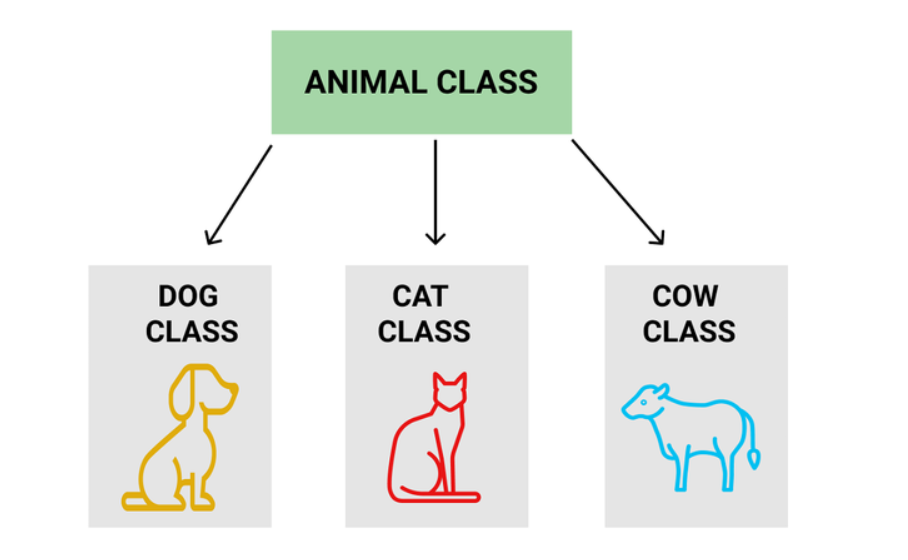
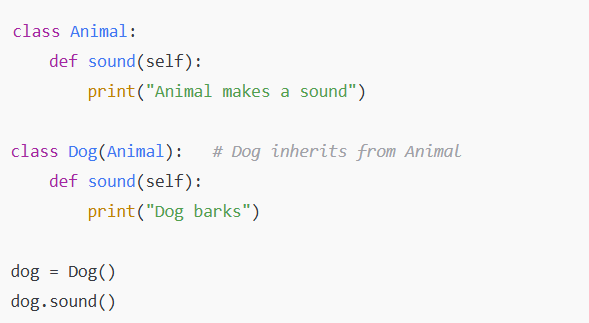
Here, Dog inherits from Animal but can also have its own features.
Polymorphism
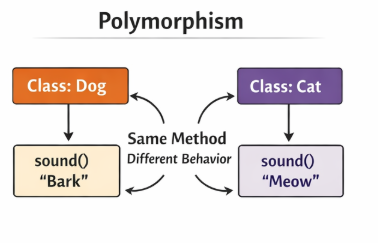
Polymorphism means same function name, different behavior.
The word “poly” means many and “morph” means forms → many forms.
Example:
Both Classes have a method named sound() but produce different outputs.
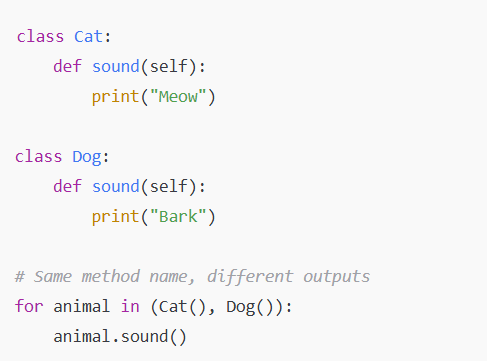
Python decides which sound() method to run based on the object.
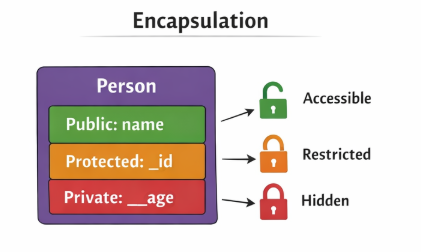
Encapsulation
Encapsulation means keeping data safe and hidden.
We bundle:
data (variables)
methods (functions) inside a class and control access to them.
In Python:
public → can be accessed anywhere
protected → use _var (convention)
private → use __var (name-mangled)
Example:
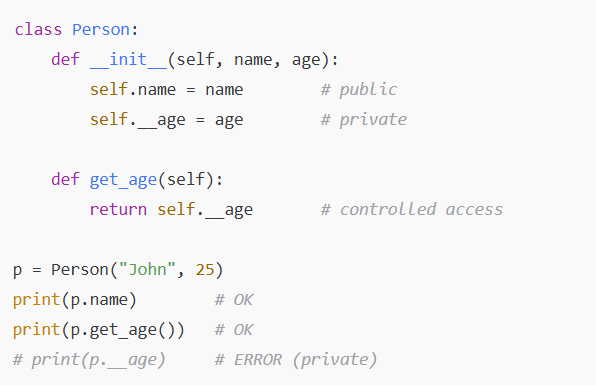
Encapsulation prevents direct access to sensitive data.
Data Abstraction
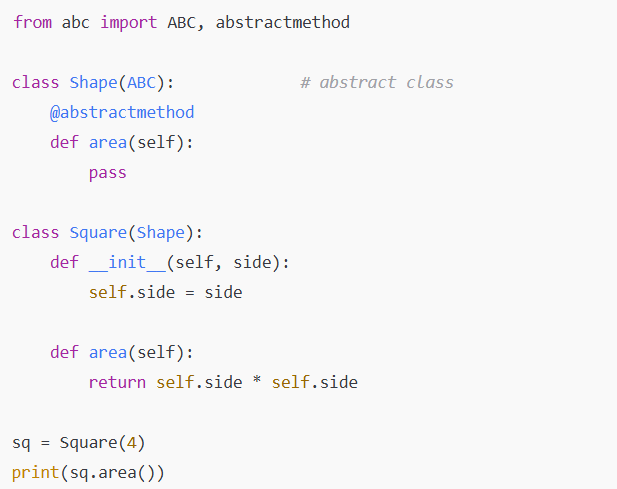
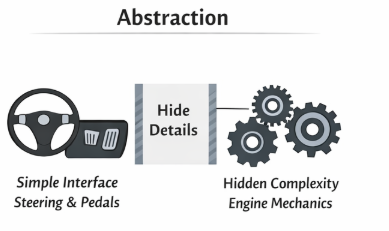
Abstraction means showing only necessary details and hiding the unnecessary ones.
You interact with a simple interface, while the complex code stays hidden.
Real-life example:
When you drive a car, you only use steering and pedals. You don’t see how the engine works - that’s abstraction.
Example:
Iterators and Generators
Iterators
What is an Iterator?
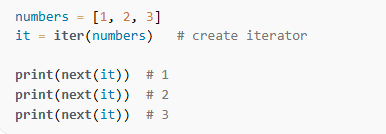
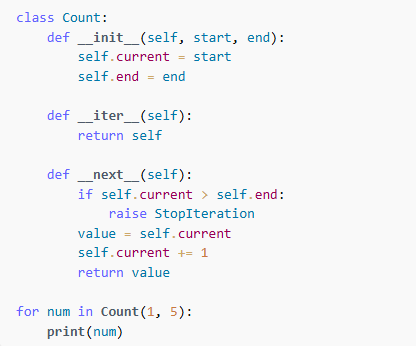
An iterator is an object that allows you to go through a sequence one item at a time.
In Python, an object becomes an iterator if it has two methods:
iter() → returns the iterator object itself
next() → returns the next value in the sequence
When there are no more items, next() raises a StopIteration error.
Everyday example:
Think of an iterator like a bookmark in a book. Each time you call next(), you move to the next page.
Example:
Creating your own iterators:
Generators
What is a Generator?
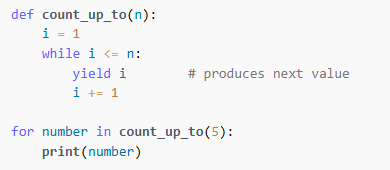
A generator is a simpler way to create an iterator using the yield keyword.
Generators:
Do NOT store all values in memory
Produce values one at a time
Are memory-efficient
Why use generators?
Because they only generate a value when needed (lazy evaluation), they are perfect for:
large datasets
infinite sequences
streaming data
Example:
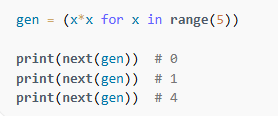
Generator Expression:
Decorators
A decorator is a special function in Python that modifies or adds extra functionality to another function--without changing the function’s actual code.
Think of a decorator like adding a “wrapper” around your function.
They help you:
Add extra behavior to existing functions
Reuse that behavior easily
Keep your code clean and readable
Common uses:
Logging
Authentication
Performance timing
Access control
Basic Idea:
If you have a function:
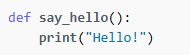
A decorator allows you to wrap this function and add something before or after it runs--without editing say_hello() directly.
Simple Example:
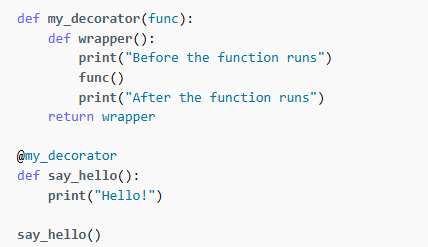
Output:
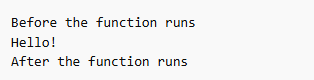
How It Works (Step by Step):
my_decorator takes a function as input.
It defines a new function wrapper() that adds extra code.
It returns the new wrapper() function.
Using @my_decorator replaces the original function with the wrapper.
So, say_hello() now means wrapper()
Decorator with Arguments
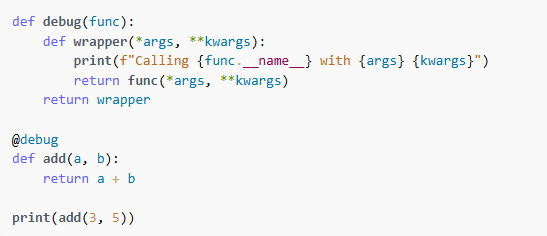
Decorators with Parameters
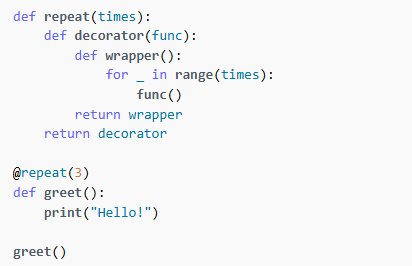
Regular Expression
Regular Expressions, often called Regex, are patterns used to search, match, and manipulate text.
Think of regex like a powerful search tool that can find:
words
numbers
dates
emails
phone numbers
patterns in text
Python provides regex support through the re module.
Importing the Regex Module
import re
Common Regex Functions
| Function | Description |
|---|---|
| re.search() | Searches for the first match |
| re.match() | Checks for match at the beginning of string. |
| re.findall() | Returns all matches as a list |
| re.sub() | Replaces a pattern with a new string |
| re.split() | Splits text using a regex pattern |
Basic Pattern Symbols
| Symbol | Meaning | Example |
|---|---|---|
| . | Any single character | "c.t" matches "cat", "cut" |
| ^ | Start of string | "^Hello" |
| $ | End of string | "world$" |
| * | 0 or more repetitions | "go*" matches "g", "go", "goo" |
| + | 1 or more repetitions | "go+" matches "go", "goo" |
| ? | 0 or 1 repetition | "colou?r" matches "color", "colour" |
| {n} | exactly n times | "a{3}" → "aaa" |
| {n, m} | between n and m times | "a{2,4}" |
Character Sets
| Pattern | Meaning |
|---|---|
| [abc] | any one of a, b, or c |
| [0-9] | any digit |
| [A-Za-z] | any letter |
| [^abc] | NOT a, b, or c |
Predefined Character Classes
| Pattern | Meaning |
|---|---|
| \d | digit (0–9) |
| \D | non-digit |
| \w | word character (letters, numbers, _) |
| \W | non-word character |
| \s | whitespace |
| \S | non-whitespace |
Simple Examples
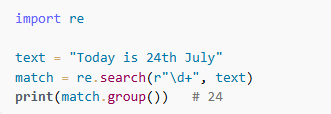
Check if a string contains a number:
Find all words starting with ‘a’

Replace Multiple Space with a single space

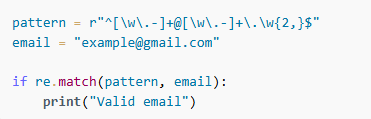
Validate an Email
File Handling
File handling allows Python programs to create, read, write, and modify files on your computer. Python provides built-in functions to work with files easily and safely.
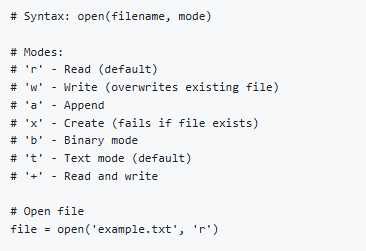
Opening a File
Python uses the open() function:

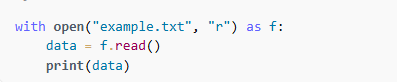
Reading from a File
read() - read entire file
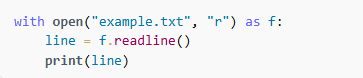
readline() - reads one line at a time
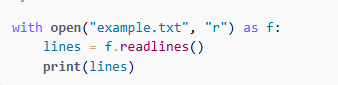
readlines() - returns list of all lines
Writing to a File
write() - write text into a file

writelines() - write multiple lines

Appending to a File

Using with Statement
The with statement automatically:
opens the file
closes it after use even if an error occurs.

Checking if a File Exists
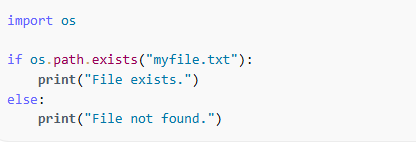
Deleting a File
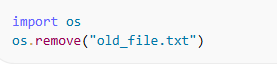
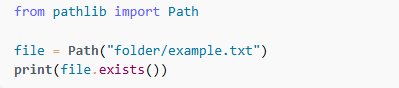
Working with File Paths
Comprehensions
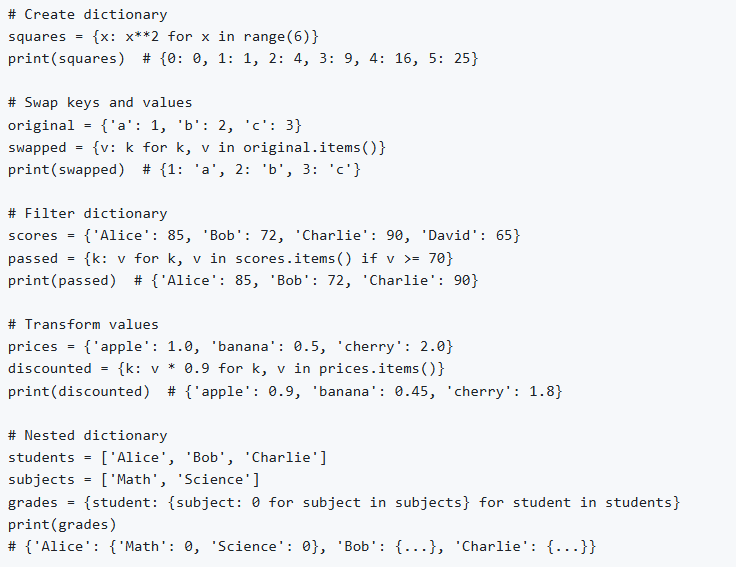
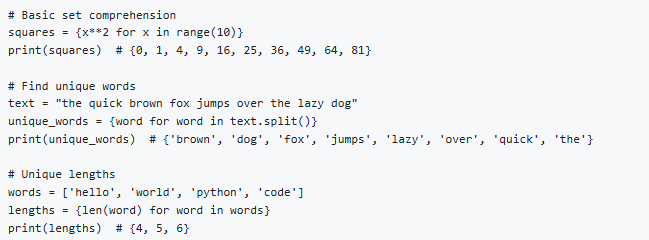
Comprehensions are short, powerful, and readable ways to create new collections (lists, sets, or dictionaries) from existing sequences.
Nested List Comprehension
A nested list comprehension is a list comprehension inside another list comprehension. It is commonly used when you work with 2D lists (lists of lists) or when you need multiple loops in one line.
It is a cleaner and shorter alternative to writing nested for loops.
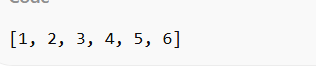
Flatten a 2D List
Without nested comprehension:
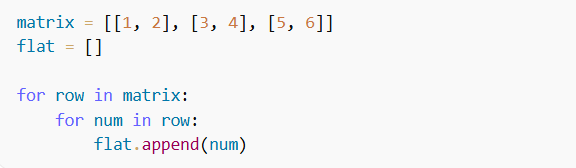
With nested comprehension:

Output:
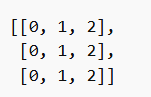
Create a matrix using nested list comprehension

Output:
Conditional Comprehension
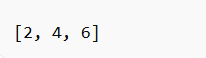
Example: Only keep even numbers from a 2D list.
Output:

Dictionary Comprehension
Set Comprehension
Working with Date and Time
Datetime Module in Python
Python's datetime module allows you to work with dates, times, timestamps, and time intervals.
To start using it:

Getting Current Date and Time
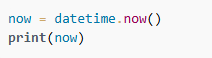
Output:

Only Current Date
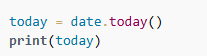
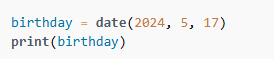
Creating Date and Time Objects
Create a date
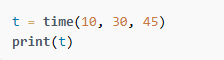
Create a Time
Create a full datetime

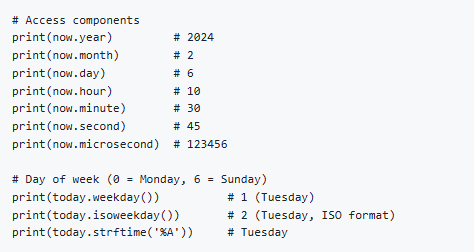
Access Components
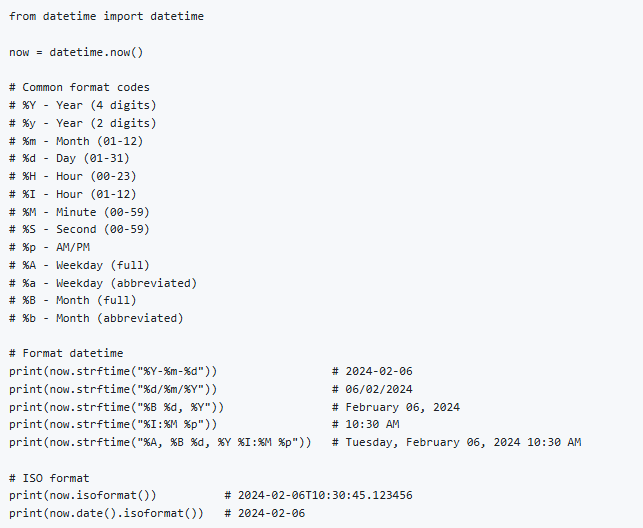
Formatting Dates
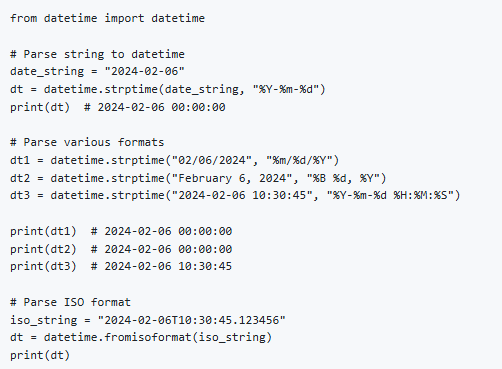
Parsing Dates
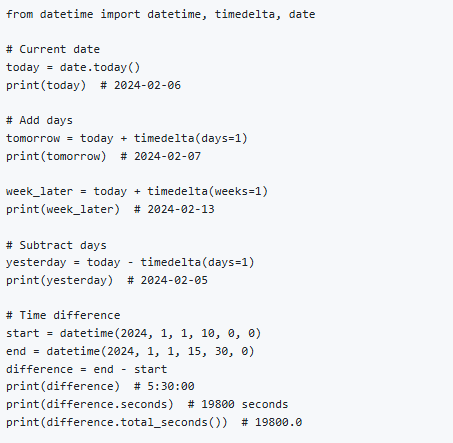
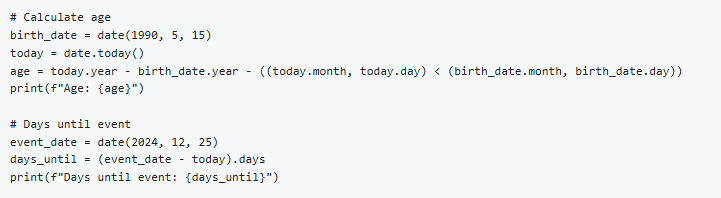
Date Arithmetic
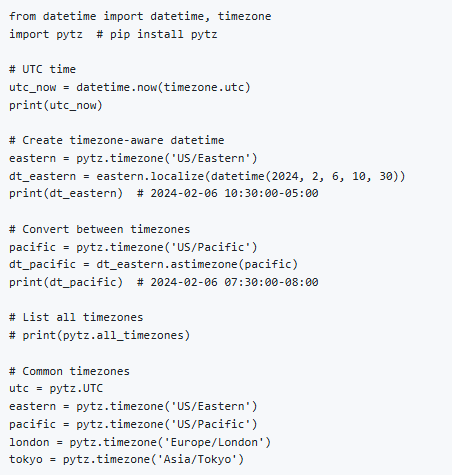
Working with Timezones
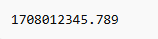
Working with Unix Timestamps

Output:
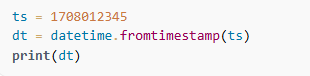
Converting Timestamp to Datetime
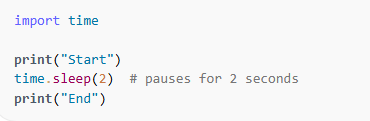
Sleep / Delay (time module)
Functional Programming Concepts
Lambda Function
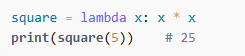
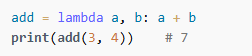
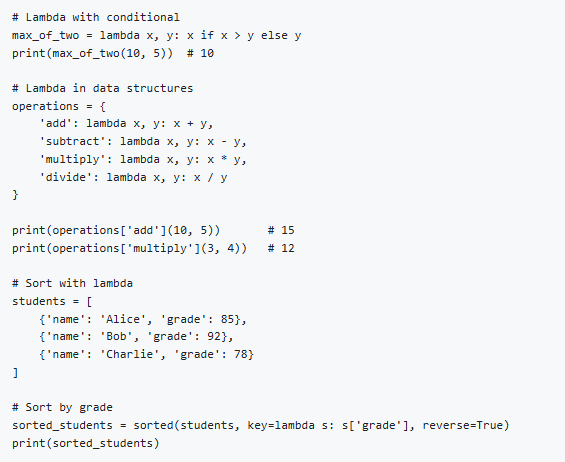
A lambda is a small anonymous function (a function without a name).
Syntax:

Example: square of a number
Example: add two numbers
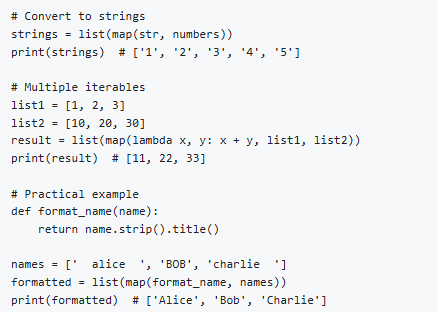
Map Function
map() applies a function to each item of an iterable (list, tuple, etc.).
Syntax:

Example: Square all numbers
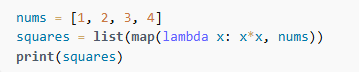
Output:

Filter
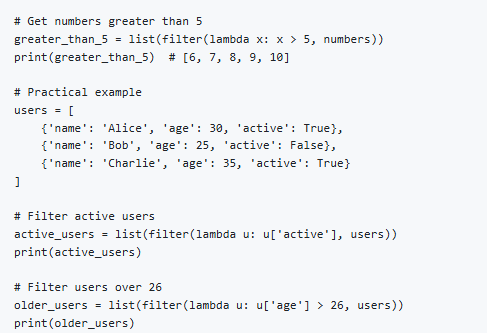
Syntax:

The function must return True or False
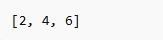
Example: Keep even numbers

Output:

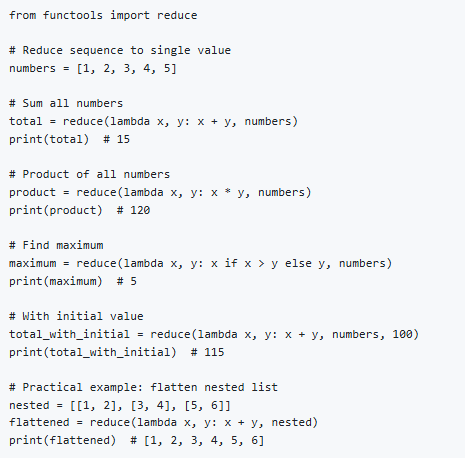
Reduce Function
reduce() applies a function cumulatively to items of a list. It is available in the module functools.
Syntax:

Example: Sum of all numbers
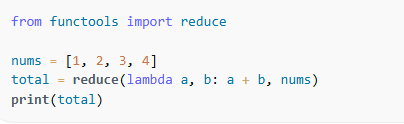
Output:

Modules and Packages in Python
Working with modules and packages helps organize code, reuse functionality, and keep programs clean and manageable.
What is a Module?
variables
functions
classes
Code
Example: mymath.py
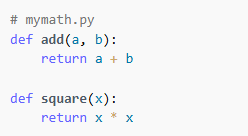
Using the module
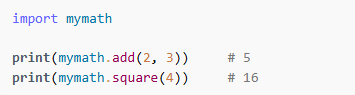
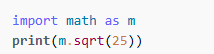
Importing Modules
Different ways to import
Import module
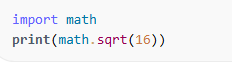
Import module as alias
From module import something

Built-in Modules
Python comes with many pre-installed modules:
math
random
datetime
os
sys
functools
Statistics
Example:

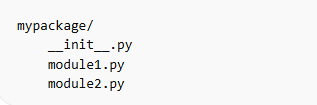
What is a Package?
A package is a collection of modules stored in a directory containing an init.py file.
Folder structure:
Example:
module1.py
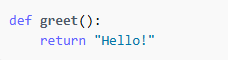
Using the package:

Nested Packages
Packages can contain sub packages:
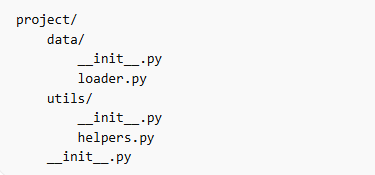
Importing from nested package

Why Use Modules and Packages?
Code reusability
Clean organization
Easier maintenance
Collaboration in large projects
Avoids writing the same code again
Python Advance
Working with JSON and APIs
APIs and JSON are widely used in modern applications for sending and receiving data between systems.
1. What is JSON?
JSON (JavaScript Object Notation) is a lightweight data format used for:
Storing data
Transmitting data between computers
APIs (web services)
Example JSON:
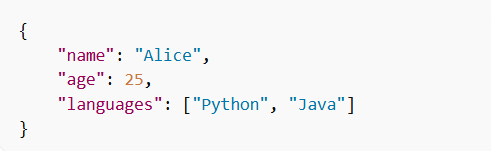
JSON looks like Python dictionaries - that's why Python can work with it easily.
Working with JSON in Python (json Module)
Python provides a built-in module:

Converting Python Data to JSON (json.dumps)
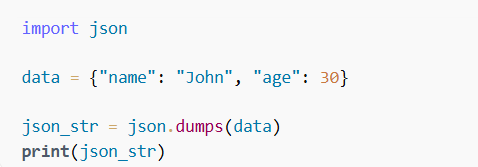
Output:

Converting JSON to Python (json.loads)
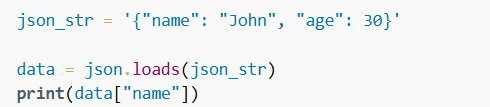
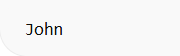
Output:
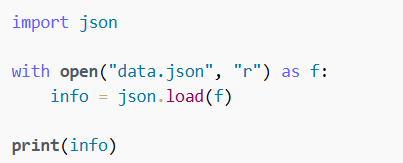
Reading JSON from a File
Writing JSON to a File
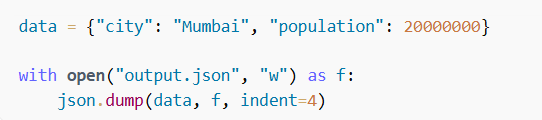
indent=4 makes the JSON pretty and readable.
Working with APIs
API = Application Programming Interface APIs allow your program to communicate with servers and fetch data, commonly as JSON.
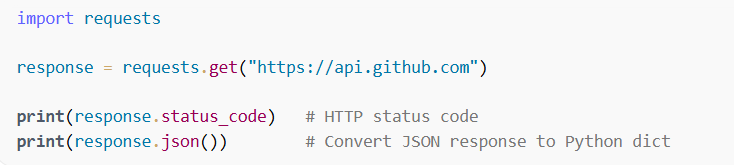
To call APIs in Python, we use the requests module.

Making a Simple API Request
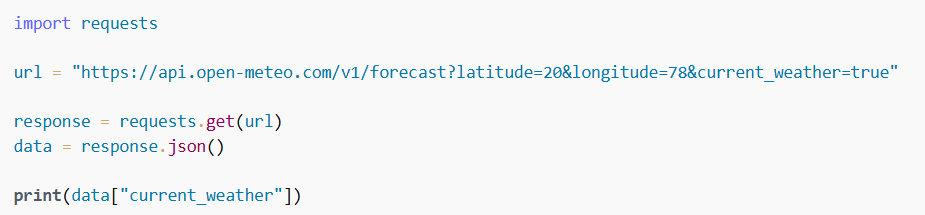
Example: Fetching Weather Data
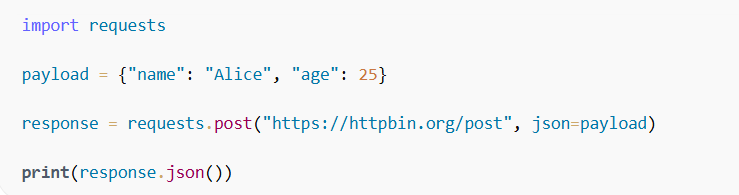
Sending Data to an API (POST Request)
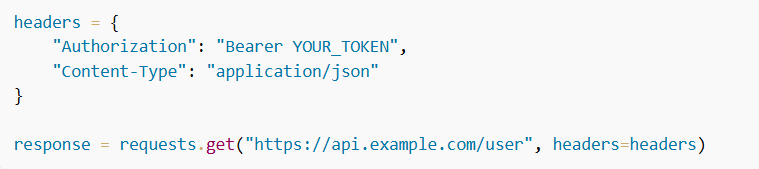
Adding Headers (Authentication Example)
Database Connectivity
What Is Database Connectivity?
Database connectivity refers to the methods, tools, and protocols that allow an application (like a Python script, website, or mobile app) to communicate with a database such as MySQL, PostgreSQL, or MongoDB.
It enables your program to:
✔ Connect to a database server ✔ Send queries (SELECT, INSERT, UPDATE, DELETE) ✔ Receive results ✔ Close the connection safely
Why Is It Important?
Without database connectivity, applications would not be able to:
Store user information
Fetch records
Save form inputs
Handle login systems
Manage transactions (shopping carts, orders, payments, etc.)
Any dynamic application needs a database connection.
Components of Database Connectivity
1️⃣ Database Server
Where the data lives Examples: MySQL, PostgreSQL, MongoDB
2️⃣ Client Application
Your program (Python, Java, PHP, Node.js, etc.)
3️⃣ Database Driver
A library that allows communication Examples in Python:
mysql-connector-python
psycopg2 (for PostgreSQL)
pymongo (for MongoDB)
4️⃣ Connection String
A formatted string that defines:
Host
Port
Username
Password
Database name
Example (MySQL):

Example: Database Connectivity in Python (MySQL)
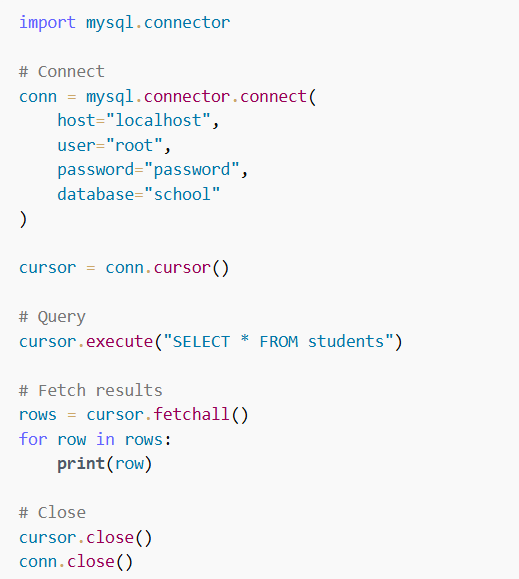
Note: Take some time to search what a "cursor" is in database programming. It is an important concept because:
A cursor acts as a pointer to the result set returned from the database.
It allows your program to fetch rows one by one or all at once.
It manages the lifecycle of queries and results.
Understanding cursors will help you write safer, cleaner, and more efficient database code.
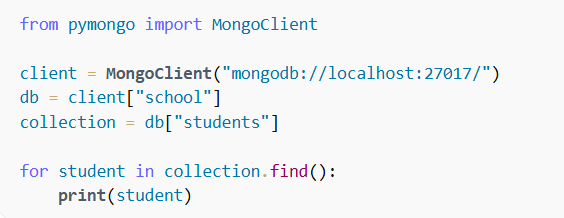
Example: Database Connectivity in Python (MongoDB)
mysql.connector
mysql.connector is a Python library provided by MySQL itself. It allows Python programs to:
Connect to a MySQL database
Send SQL queries (SELECT, INSERT, UPDATE, DELETE)
Fetch results
Manage transactions
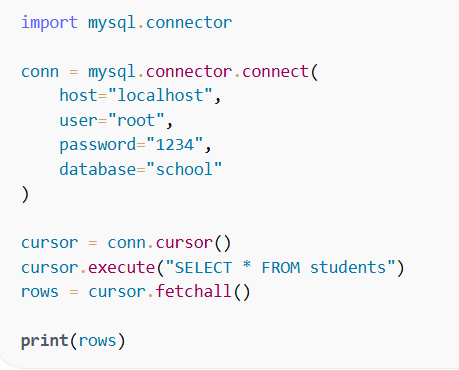
Example:
Select query:
Insert Query:
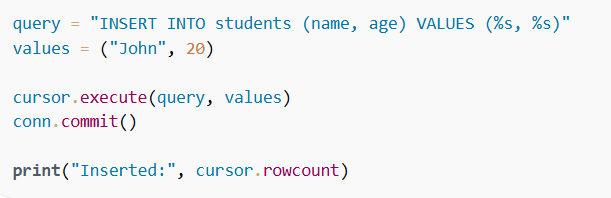
Now that you know how to write SELECT and INSERT queries using mysql.connector, try writing UPDATE and DELETE queries yourself.
SQLAlchemy
SQLAlchemy is a very powerful and popular database toolkit for Python.
It works with many databases, such as:
MySQL
PostgreSQL
SQLite
Oracle
SQL Server
Install:

Create Engine:

SELECT Query:

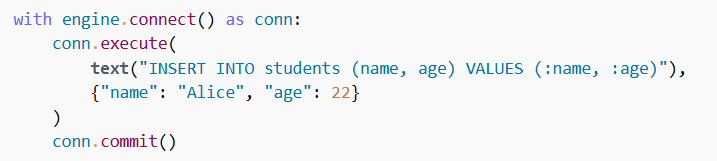
INSERT Query:
Testing in Python
Testing in Python ensures that your code works correctly and continues to work even after changes. Python provides built-in and third-party tools for writing tests.
There are three common types of tests:
Unit Tests → Test small functions
Integration Tests → Test multiple components working together
End-to-End Tests → Test the entire application workflow
Built-in Testing Framework: unittest
unittest is included with Python (no installation required).
Structure of a unittest program:
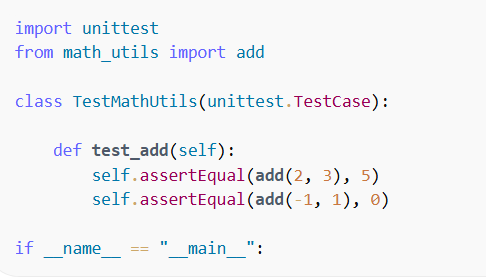
Create a class that inherits from unittest.TestCase
Write test functions beginning with test_
Use assertions like
assertEqual(a, b) - Checks whether two values are equal, used to verify that a function returns the expected output.
assertTrue(condition) - Checks whether a given condition is True. Used when you want to verify a boolean expression or condition.
assertRaises(ErrorType) - Checks that a specific exception is raised. Used to test error handling and ensure invalid inputs correctly raise exceptions.
Example - Testing a simple function:
Run Test:

Testing with PyTest
PyTest is simpler, faster, and more powerful.
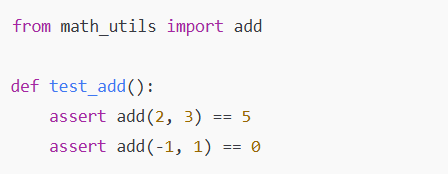
Example test:
File: test_calc.py
Run:
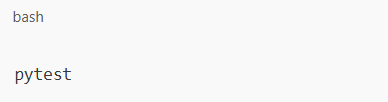
PyTest automatically detects all files starting with test_.
Mocking in Testing
Mocking is used when a function depends on:
API calls
Database queries
Network operations
System operations
You replace the real function with a fake one during testing.
Example using unittest.mock:
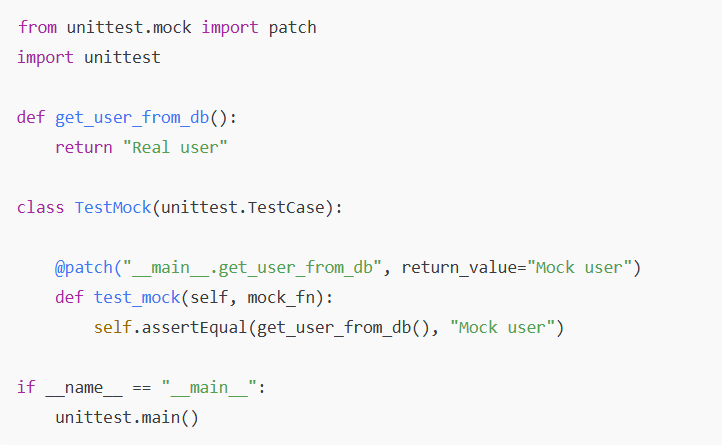
Mocked functions help you test without real dependencies.
Test Coverage
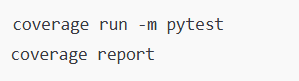
You can measure what percentage of your code is tested.
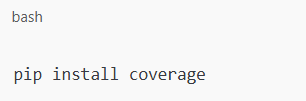
Install Coverage:
Run:
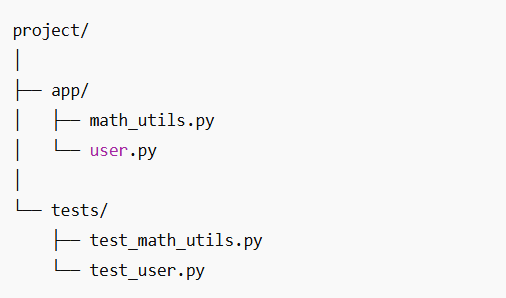
Test Folder Structure (Best Practice)
Magic Methods (Dunder Methods)
Magic methods (also called dunder methods) are special methods in Python that start and end with double underscores (method). They allow you to define how your objects behave with built-in operations like printing, adding, comparing, iterating, etc.
They make your classes behave like built-in Python types.
Why Magic Methods Are Useful?
They let you:
✔ Customize printing of objects (str) ✔ Perform arithmetic operations (add, sub) ✔ Compare objects (lt, eq) ✔ Create iterable objects (iter, next) ✔ Control object creation (new, init) ✔ Work with context managers (enter, exit)
Common Magic (Dunder) Methods and Their Use
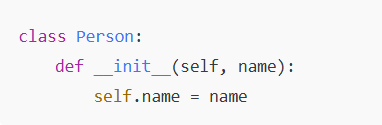
1. init – Object Initializer
Called when an object is created.
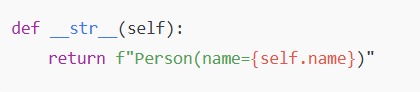
2. str – String Representation
Controls what print(object) shows.
3. repr – Official Representation
Used for debugging; should show a recreatable object string.

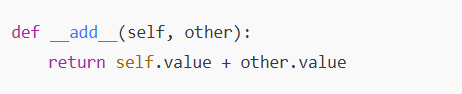
4. add – Add Operator (+)
Defines behavior for object1 + object2.
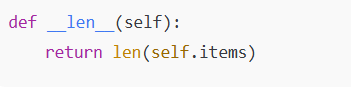
5. len – Length of Object
Called by len(object).
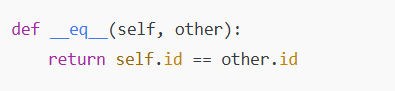
6. eq – Equality (==)
Defines when two objects are considered equal.
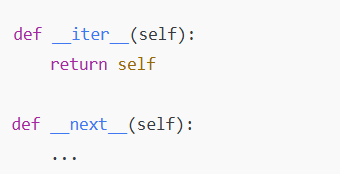
7. iter and next – Make Object Iterable
Used in loops and generators.
Complete Example Using Multiple Dunder Methods
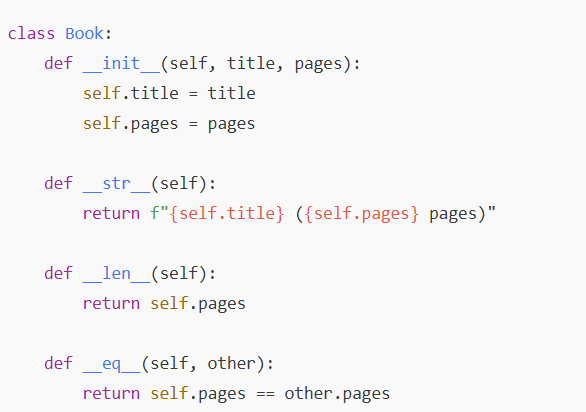
Usage:
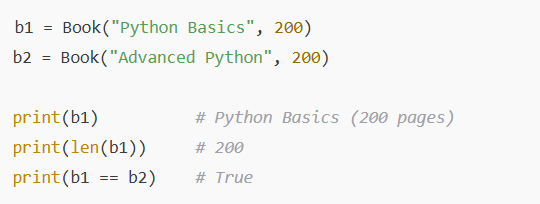
Collections Module in Python
The collections module provides specialized container datatypes that offer alternatives to Python’s built-in types (list, dict, set, tuple). These containers are faster, more efficient, and provide extra features.
namedtuple – Tuple with Named Fields
Behaves like a tuple but lets you access values using names.
Example:
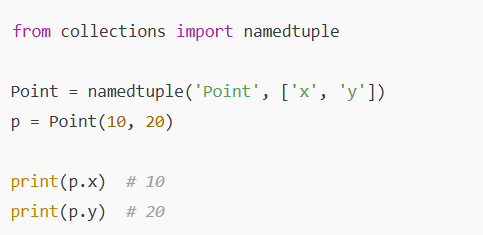
Use case: good for lightweight objects without full classes.
Counter – Counts Items in an Iterable
Creates a dictionary-like object that counts occurrences.
Example:
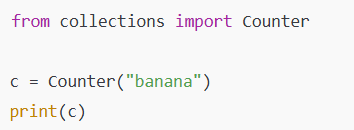
Output:

Use case: counting characters, words, frequencies.
defaultdict – Dictionary with Default Values
Provides a default value for keys that don’t exist.
Example:
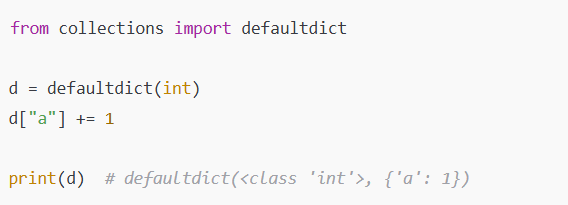
Use case: counting, grouping items, avoiding KeyError.
OrderedDict – Dictionary That Remembers Order (Python 3.6+ dicts are ordered)
Behaves like a regular dictionary but explicitly supports order-based operations.
Example:
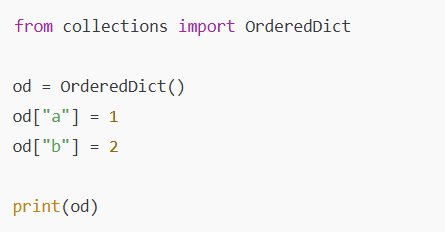
Use case: tasks where order-sensitive dictionary behavior matters.
deque – Fast Queue (Double-Ended Queue)
Much faster than list for append/pop operations on both ends.
Example:
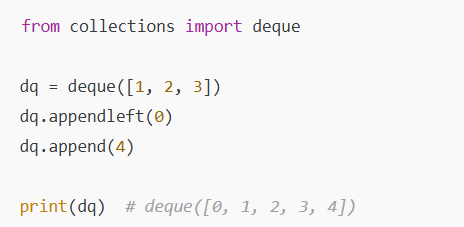
Use case: queues, BFS, sliding windows.
Resources
| Category | Resource | Link |
|---|---|---|
| Official Documentation | Python Official Documentation | docs.python.org/3/ |
| Python Tutorial | docs.python.org/3/tutorial/ | |
| Python Standard Library | docs.python.org/3/library/ | |
| Online Learning | Real Python | realpython.com/ |
| Python.org Beginner's Guide | wiki.python.org/moin/BeginnersGuide | |
| W3Schools Python | www.w3schools.com/python/ | |
| Codecademy Python | www.codecademy.com/learn/learn-python-3 | |
| freeCodeCamp Python | www.freecodecamp.org | |
| Interactive Practice | LeetCode | leetcode.com/ |
| HackerRank Python | www.hackerrank.com/domains/python | |
| Codewars | www.codewars.com/ | |
| Exercism Python Track | exercism.org/tracks/python | |
| Books (Free) | Automate the Boring Stuff with Python | automatetheboringstuff.com/ |
| Think Python | greenteapress.com/wp/think-python-2e/ | |
| Dive Into Python 3 | diveintopython3.net/ | |
| Video Tutorials | Python for Beginners (Microsoft) | www.youtube.com |
| Programming with Mosh | www.youtube.com/watch?v=_uQrJ0TkZlc | |
| Communities | Stack Overflow | stackoverflow.com/questions/tagged/python |
| Python Forum | python-forum.io/ | |
| Style Guides | PEP 8 – Style Guide | peps.python.org/pep-0008/ |
| PEP 20 – The Zen of Python | peps.python.org/pep-0020/ | |
| Google Python Style Guide | google.github.io/styleguide/pyguide.html | |
| Tools & IDEs | VS Code | code.visualstudio.com/ |
| PyCharm | www.jetbrains.com/pycharm/ | |
| Jupyter Notebook | jupyter.org/ | |
| Python Tutor (Visualize Code) | pythontutor.com/ | |
| Package Repositories | PyPI (Python Package Index) | pypi.org/ |
| Anaconda | www.anaconda.com/ |